
4.1 Module 4 Learning Outcomes
This module takes you inside the control system of the battery — the part that keeps everything safe, stable, and working properly.
By the end of this module, you will be able to:
- Explain what a Battery Management System (BMS) is and why it is essential
- Understand what the BMS monitors and how it protects the battery
- Identify the key protection triggers (overvoltage, undervoltage, temperature, current)
- Explain how cell balancing works and why it matters
- Understand how the BMS calculates and manages SOC
- Understand how communication between the battery and inverter works (CAN, RS485)
- Interpret basic battery status indicators and warning signals
- Reset and troubleshoot common BMS protection events
- Apply correct installer practices when working with BMS-based systems
4.2 What Is a BMS?
Before anything else — understand this:
👉 A lithium battery is not just storage.
👉 It is a managed system.
The BMS (Battery Management System) is the “brain” inside the battery. It
- Measures
- Controls
- Protects
- Balances
- Communicates
Without a BMS, lithium batteries would be unsafe, unstable and unreliable.
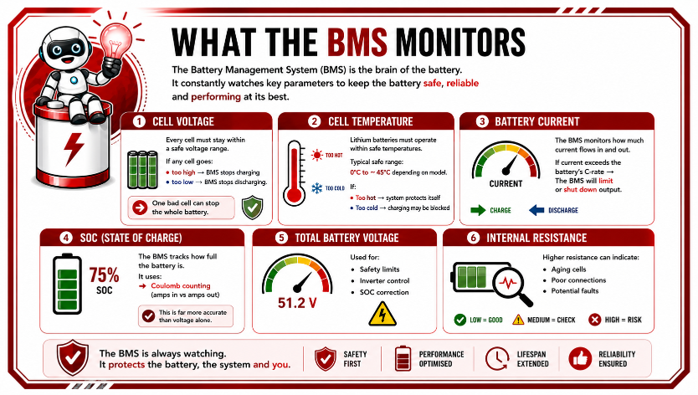
What the BMS is constantly watching
The BMS constantly monitors the battery in real time:
- Cell voltages
- Cell temperatures
- Battery current
- SOC (State of Charge)
- Charge/discharge limits
- Total voltage
- Internal resistance
- Safety conditions
4.3 Why the BMS Exists
A BMS exists to protect the battery, the connected equipment, and the user by ensuring the battery always operates within safe limits.
Lithium batteries are powerful and efficient, but they are also sensitive to conditions such as overcharging, deep discharging, excessive current, overheating, and cell imbalance. Without protection and monitoring, these conditions could damage the battery, shorten its lifespan, reduce performance, or create serious safety risks.
The BMS continuously monitors the battery and automatically takes action when something is outside of safe operating conditions.
In simple terms, the BMS exists to keep the battery safe, stable, efficient, and reliable while maximizing its performance and lifespan.
Think of the BMS as a combination of:
- A doctor (health monitoring)
- A security guard (blocking danger)
- A manager (controlling limits)
- A translator (communicating with the inverter)
4.4 What the BMS Monitors
The BMS constantly monitors important battery conditions to ensure the system operates safely, efficiently, and within its designed limits.
It acts like the battery’s intelligent safety controller, continuously checking key values such as voltage, temperature, current flow, state of charge, and overall battery health.
If any of these conditions move outside of safe operating ranges, the BMS can automatically take protective action to prevent damage, unsafe conditions, or reduced battery performance.
Let’s break it down in a practical way.
4.5 Cell Balancing — The Most Important BMS Function
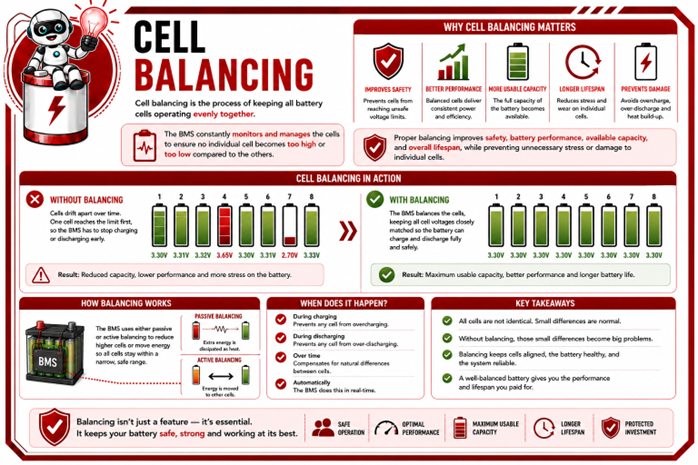
One of the most important jobs of the BMS is cell balancing.
A lithium battery is not made up of one single large cell. Inside the battery are many smaller individual cells connected together to create the required voltage and capacity. For the battery to operate properly, all these cells must work together evenly.
However, no two cells are ever 100% identical. Over time, small differences naturally develop between the cells due to:
- manufacturing tolerances
- temperature differences
- charging and discharging patterns
- age and usage
This means that some cells may charge slightly faster or discharge slightly faster than others.
What does Balancing Mean?
Cell balancing means keeping all the cells at a similar voltage and state of charge so that they work together evenly as one healthy battery pack.
Think of it like a group of people carrying a heavy table.
If:
- everyone lifts evenly → the table stays balanced and moves smoothly
- one person lifts higher or lower than the others → the table tilts and becomes unstable
Cell balancing works the same way inside the battery.
The BMS constantly checks each cell and helps ensure that no individual cell moves too far away from the others.
Why is Balancing necessary?
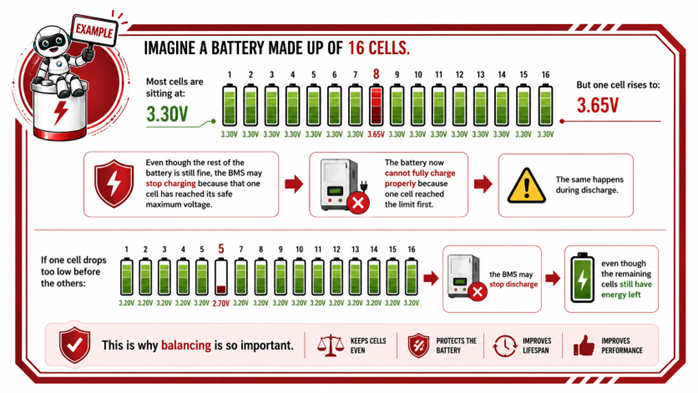
The entire battery can only perform as well as its weakest or highest cell.
If one cell becomes:
- too high in voltage
- too low in voltage
the BMS may need to reduce performance or even shut the battery down to protect it.
Even if the rest of the cells are healthy, one badly balanced cell can affect the entire battery.
What happens without Balancing?
Without proper balancing:
- cell voltages drift further apart over time
- usable battery capacity reduces
- charging becomes less efficient
- the battery may trip more often
- stress on certain cells increases
- lifespan becomes shorter
Eventually:
- some cells may become damaged permanently
How the BMS Balances Cells
The BMS continuously monitors the voltage of every individual cell.
When it notices certain cells becoming higher than others, it can:
- reduce charge to those cells
- bleed small amounts of energy away from high cells
- allow lower cells time to catch up
This process helps keep the entire battery pack balanced and stable.
Why Initial Full Charge is Critical for Balancing
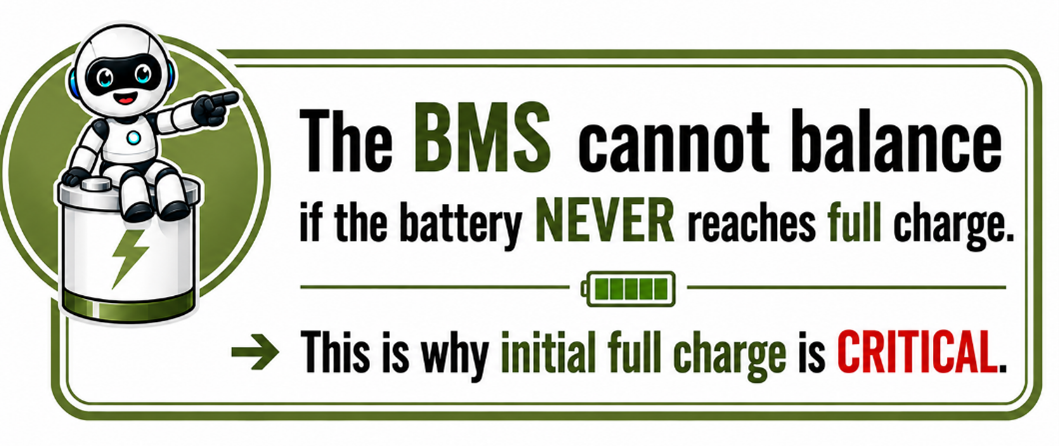
The BMS can only properly balance the cells when the battery reaches its full charging range. This is because the balancing process typically happens near the top end of the charge cycle, where the BMS can clearly identify which cells are charging faster or reaching higher voltages than the others.
If the battery never reaches full charge, the BMS does not get the opportunity to correct these small differences between the cells. Over time, the cells can drift further apart, causing imbalance within the battery pack.
Think of it like trying to level a group of runners in a race — if the race never reaches the finish line, you cannot clearly see who arrived first or last. The same happens inside the battery. The BMS needs the battery to reach full charge so it can properly compare, adjust, and balance the cells.
This is why the initial full charge is so important after installation or commissioning. It allows the BMS to synchronize and balance the cells correctly from the beginning, helping ensure:
- maximum usable capacity
- stable performance
- accurate state of charge readings
- proper battery operation
- longer battery lifespan
Without reaching full charge regularly, the battery may eventually show reduced performance, premature shutdowns, or inaccurate battery readings even though the cells still contain energy.
4.6 Protection Modes — Why the BMS Shuts Down
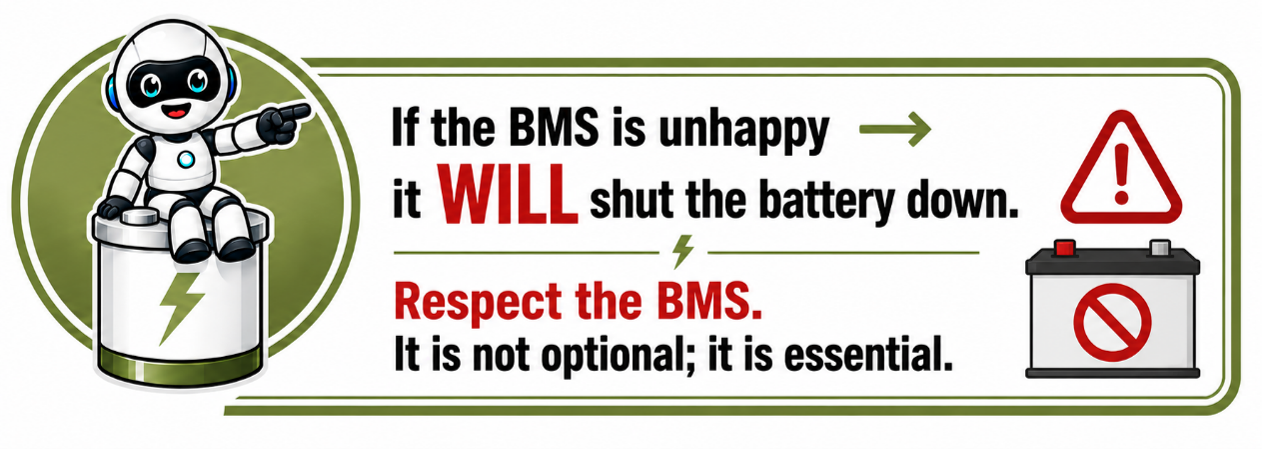
When the BMS trips, it’s not a fault — it’s protection.
The BMS will shut down if it detects:
❗ Overvoltage
Charging pushed too high (wrong inverter settings).
❗ Undervoltage
Battery drained too far.
❗ Overtemperature
Hot environment or poor airflow
❗ Undertemperature
Charging at sub-zero temperatures.
❗ Overcurrent
Load exceeds battery capability
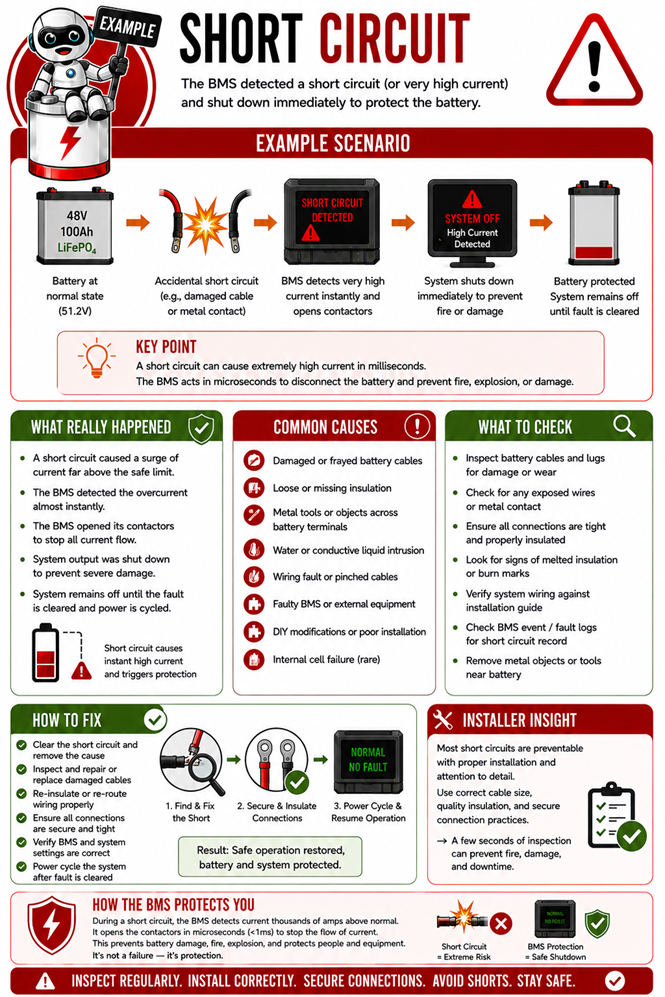
❗ Short circuit
Instant disconnect for safety.

4.7 BMS Communication Protocols
Modern lithium batteries do not work alone, they constantly communicate with other devices in the system. This communication happens through what are called communication protocols.
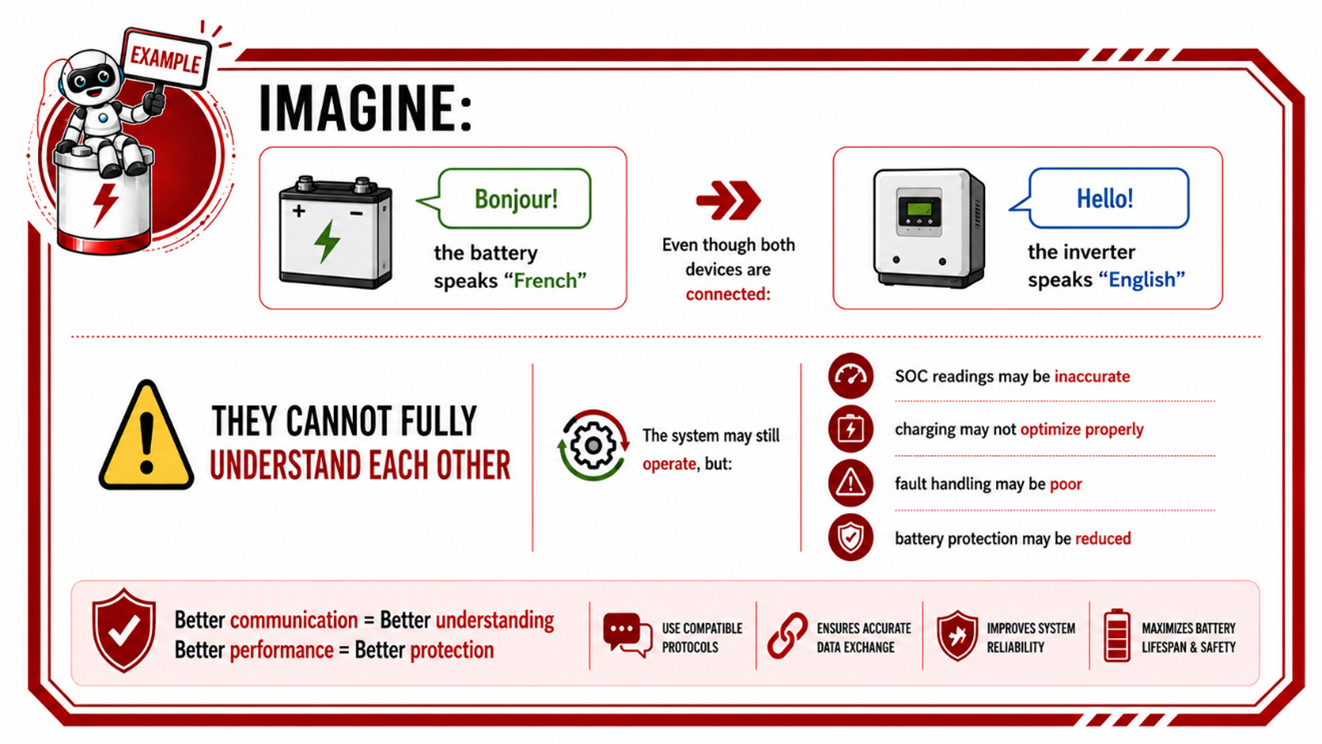
A communication protocol is simply a language that allows the battery's BMS and other equipment, such as the inverter, to exchange information and work together correctly.
Think of it like two people trying to have a conversation. If both people speak the same language, communication is clear and everything works properly. If they speak different languages, misunderstandings happen.
The same applies to batteries and inverters.
Why Communication is Important
The BMS continuously monitors important battery information such as:
- battery voltage
- current flow
- temperature
- state of charge (SOC)
- alarms and warnings
- charging limits
- battery health
The BMS then sends this information to the inverter or other system devices so the entire system can operate safely and efficiently.
Without communication:
- the inverter is mostly guessing
- charging may not be optimized
- battery protection becomes limited
- performance may reduce
- faults and shutdowns become more likely
What the BMS Communicates
The BMS may communicate:
- how full the battery is
- maximum charge current allowed
- maximum discharge current allowed
- battery temperature
- warnings or fault conditions
- whether charging should stop
- whether discharge should stop
This helps protect the battery while improving performance and lifespan.
Common Communication Protocols
Different manufacturers use different communication protocols, which are simply different languages that batteries, inverters, and other devices use to communicate with each other.
Some of the most common protocols used in battery systems include:
- CAN Bus (CAN communication)
- RS485
- Modbus
- RS232
For proper system operation, the battery and inverter must be able to understand the same communication language. Even if the battery is connected correctly and the voltage matches the inverter requirements, poor or incompatible communication can still lead to problems such as
- inaccurate state of charge readings,
- poor charging performance,
- limited battery protection,
- nuisance alarms, or
- unstable system behaviour.
Proper protocol compatibility ensures that all devices in the system can communicate effectively and operate safely, efficiently, and reliably together.
Battery-to-Battery Communication
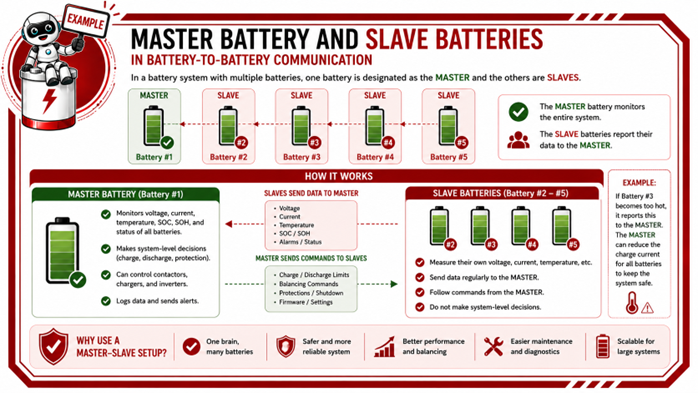
In systems where multiple lithium batteries are connected in parallel, the batteries also need to communicate with each other, not just with the inverter. This allows all the batteries in the system to operate together as one coordinated battery bank instead of as separate independent batteries.
Think of it like a team carrying a heavy object together. If everyone lifts and walks at the same pace, the load is shared evenly and the job becomes stable and efficient. But if one person carries more weight or moves faster than the others, the load becomes uneven and problems start to occur. Battery-to-battery communication works in a very similar way.
The batteries continuously exchange important information such as:
- voltage
- current
- temperature
- state of charge
- alarms and warnings
- charging and discharge limits
This communication allows the system to:
- balance the workload evenly between batteries
- synchronize charging and discharge behaviour
- improve battery protection
- improve system stability
- prevent one battery from working harder than the others
In most parallel battery systems, one battery is automatically assigned as the master battery. The master battery communicates with the inverter and coordinates the operation of the other batteries, commonly referred to as slave batteries.
The slave batteries then follow the instructions and operating parameters of the master battery so that the entire battery bank functions as one unified system.
Without proper battery-to-battery communication, the batteries may not share load evenly, charging may become inconsistent, alarms may occur more frequently, and overall system performance and battery lifespan may be reduced.
4.8 How the BMS Calculates SOC Accurately
State of Charge, or SOC, is the battery’s estimated “fuel level”, similar to the fuel gauge in a vehicle. It tells the user approximately how much usable energy remains in the battery, usually shown as a percentage from 0% to 100%.
Calculating SOC accurately in a lithium battery is actually quite complex. Unlike a fuel tank, you cannot simply “look inside” the battery to see how full it is. Instead, the BMS uses a combination of measurements, calculations, and historical data to estimate the battery’s charge level as accurately as possible.
The BMS Uses Multiple Factors
The BMS constantly monitors and calculates:
- voltage
- current flow
- charging and discharge activity
- battery temperature
- cell behaviour
- historical energy usage
It then combines all this information to estimate the remaining battery capacity.
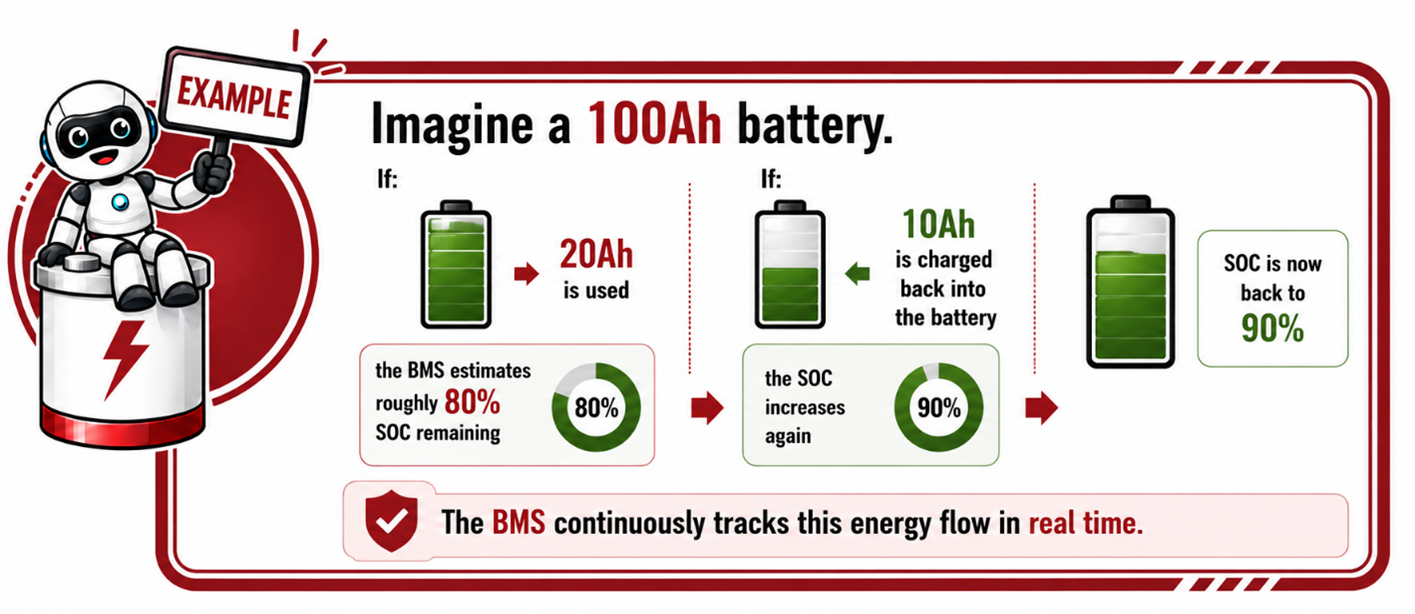
Coulomb Counting – Tracking Energy In and Out
One of the main methods used is called coulomb counting.
This means the BMS continuously measures:
- how much energy goes into the battery during charging
- how much energy leaves during discharge
Think of it like tracking money in a bank account:
- deposits increase the balance
- withdrawals reduce the balance
The BMS does something very similar with battery energy.
Why Voltage Alone Cannot Determine SOC
Many people assume battery voltage directly indicates how full the battery is, but lithium batteries behave differently from older battery technologies.
A lithium battery can maintain a very similar voltage across a large portion of its charge range.
This means:
- a battery at 80% SOC
- and a battery at 40% SOC
may still display very similar voltage readings.
This is why the BMS cannot rely on voltage alone and instead uses multiple measurements and calculations together to determine SOC more accurately.
Why Full Charge is Important for SOC Accuracy
Over time, small calculation deviations naturally occur during normal operation.
To maintain accurate SOC readings, the BMS requires reference points to recalibrate itself, with a full charge being one of the most important.
When the battery reaches full charge:
- the BMS can synchronize and balance the cells
- verify the battery is fully charged
- correct small SOC calculation inaccuracies
- improve overall SOC accuracy
This is why allowing the battery to periodically reach full charge is important for maintaining accurate battery readings and stable system operation.
Temperature and Cell Balancing Also Affect SOC
Battery temperature and cell balance directly influence SOC calculations.
Changes in temperature affect battery performance and energy delivery, while unbalanced cells can reduce calculation accuracy and usable capacity.
The BMS therefore continuously monitors:
- battery temperature
- cell voltages
- balancing status
to improve SOC estimation and maintain safe operation.
Why Accurate SOC Matters
Accurate SOC calculation is critical for:
- reliable runtime estimation
- proper inverter operation
- battery protection
- efficient charging and discharging
- overall system stability
Incorrect SOC readings can result in:
- unexpected shutdowns
- reduced battery performance
- inaccurate runtime estimates
- charging problems
- poor system behaviour
The BMS therefore plays a critical role in ensuring the SOC displayed to the user is as accurate and reliable as possible.
4.9 LED Indicators & Display Messages
Each battery model varies, but typically LEDs show:
- Running (normal operation)
- Charging
- Discharging
- BMS warning
- BMS error/trip
Always check the manual for LED meaning for the specific REVOV model.
4.10 Resetting a BMS Protection Event
A BMS protection event occurs when the Battery Management System detects an unsafe operating condition and temporarily protects the battery by limiting or stopping charging and/or discharging.
This is a normal safety function designed to prevent damage to the battery, connected equipment, or the user.
Common protection events may include:
- overvoltage
- undervoltage
- overcurrent
- short circuit
- overtemperature
- communication faults
- cell imbalance
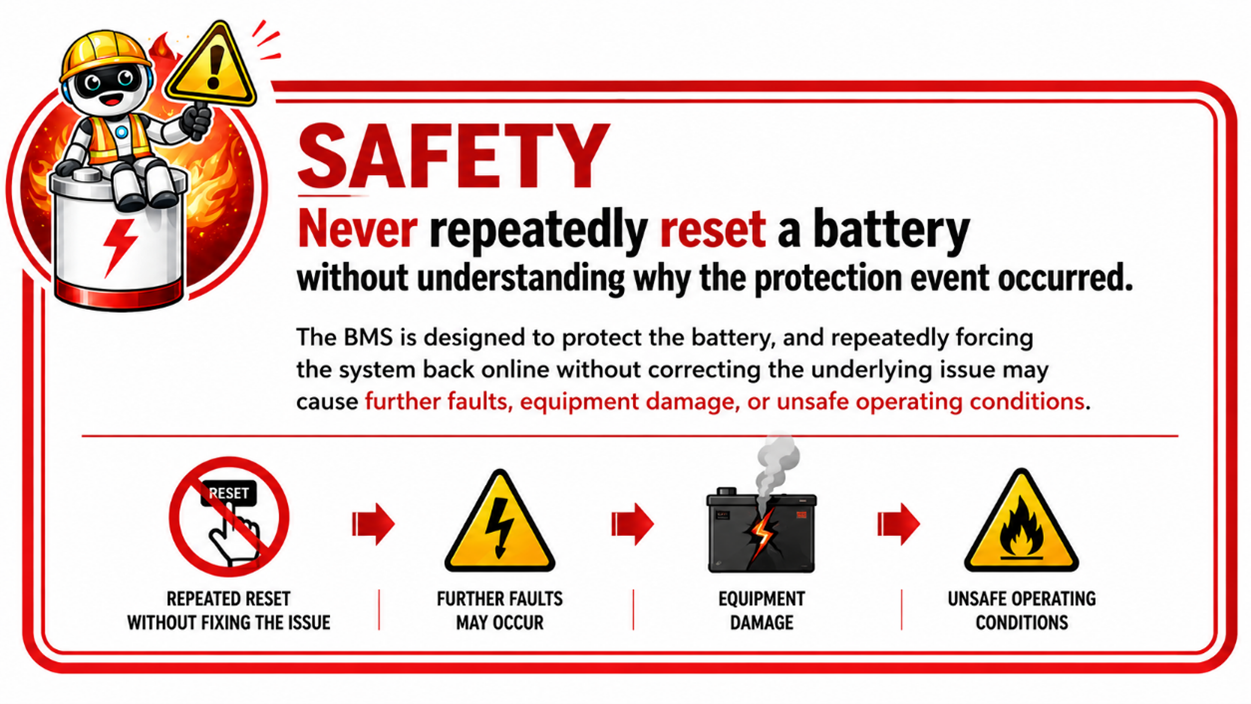
When a protection event occurs, the first step is always to identify and correct the cause of the fault before attempting to reset the battery.
General Reset Process
The exact reset procedure may vary depending on the battery manufacturer and system design, but the following process is commonly used in lithium battery systems.
Step 1 – Identify the Fault
Check:
- inverter alarms
- battery indicators
- monitoring software
- communication messages
Determine what caused the protection event. For example:
- low battery voltage
- excessive load
- overheating
- incorrect settings
- communication failure
The fault condition must be corrected first.
Step 2 – Remove the Cause of the Fault
Before resetting:
- reduce or disconnect excessive loads
- allow the battery to cool down if overheated
- verify correct inverter and charging settings
- inspect cables and connections
- check communication cables
- ensure voltage is within safe operating range
The BMS may not reset if the unsafe condition still exists.
Step 3 – Isolate the Battery (If Required)
In some systems, the battery may need to be safely isolated by:
- switching off the inverter
- opening the battery isolator or breaker
- disconnecting charging sources if required
Always follow manufacturer procedures and safe isolation practices.
Step 4 – Restart the Battery
Depending on the battery design, the reset may occur by:
- pressing the battery power/reset button
- cycling the battery off and back on
- reconnecting the breaker or isolator
- applying a charging source
- allowing the BMS to automatically recover
Some low-voltage protection events automatically reset once charging is detected.
Why the BMS Sometimes 'Locks' the Battery
Some serious protection events may place the battery into a locked protection state to prevent repeated damage.
This may happen after:
- severe undervoltage
- repeated faults
- internal BMS errors
- short circuits
In these cases:
- special reset procedures
- software tools
- or technical support
may be required.
Important Installer Considerations
When troubleshooting protection events, always verify:
- correct inverter settings
- correct battery communication
- proper cable sizing
- secure terminations
- correct breaker and fuse sizing
- adequate ventilation
- proper commissioning procedure
4.11 Practical Installer Examples
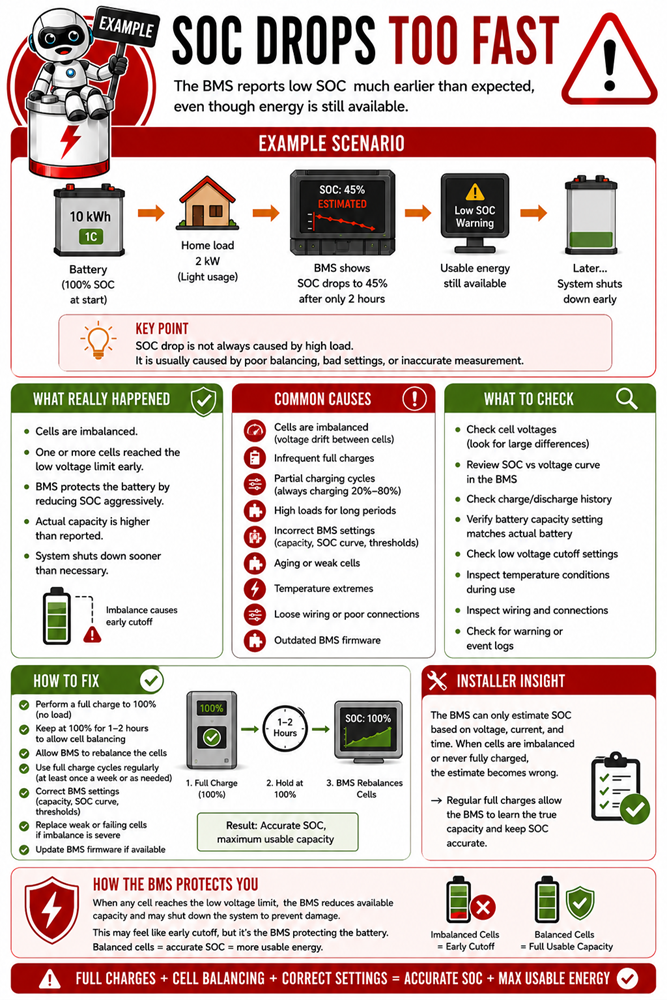
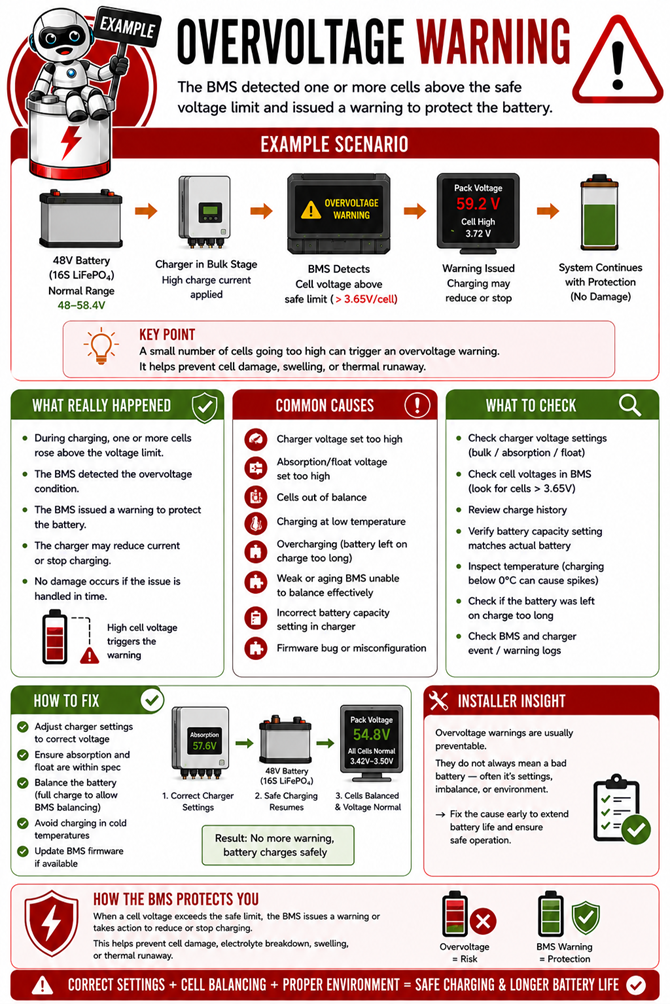
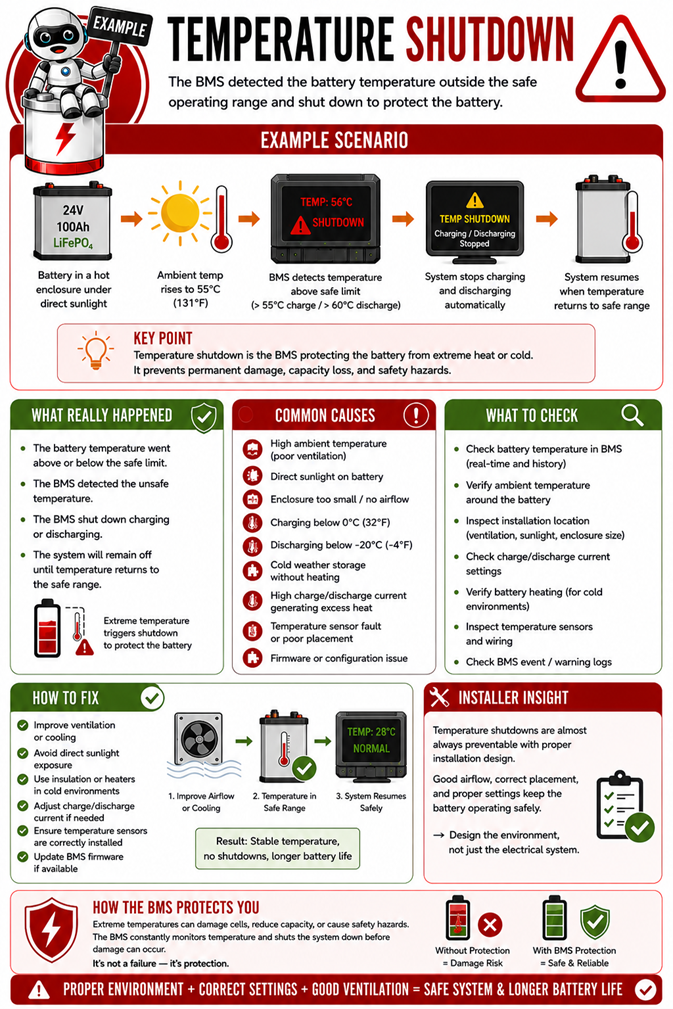
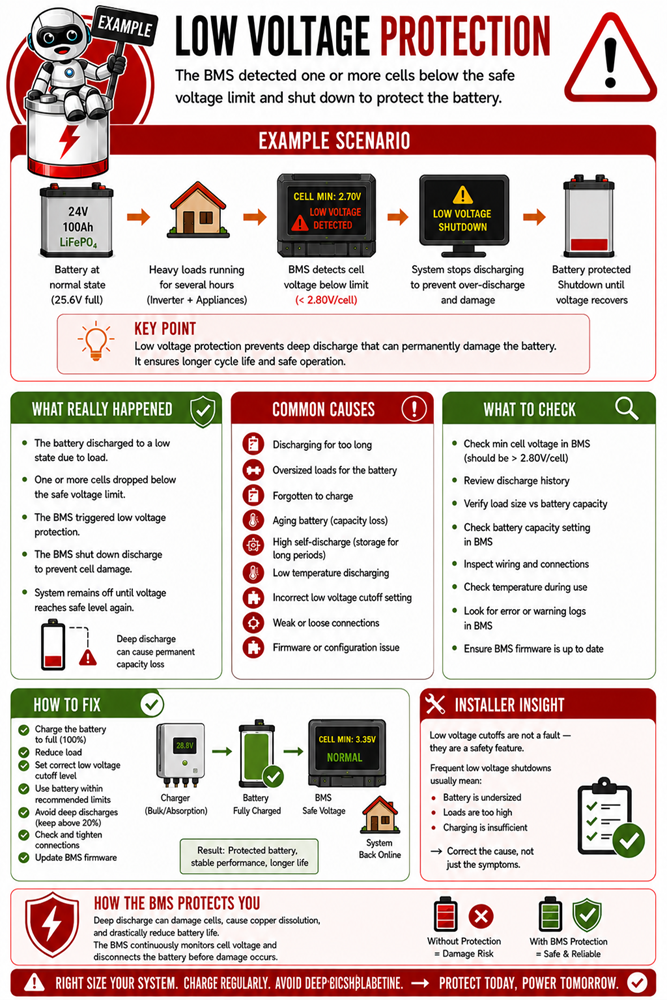
Understanding what the Battery Management System (BMS) does in theory is only the first step.
Professional installers must also understand how the BMS behaves in real installations and why it responds the way it does.
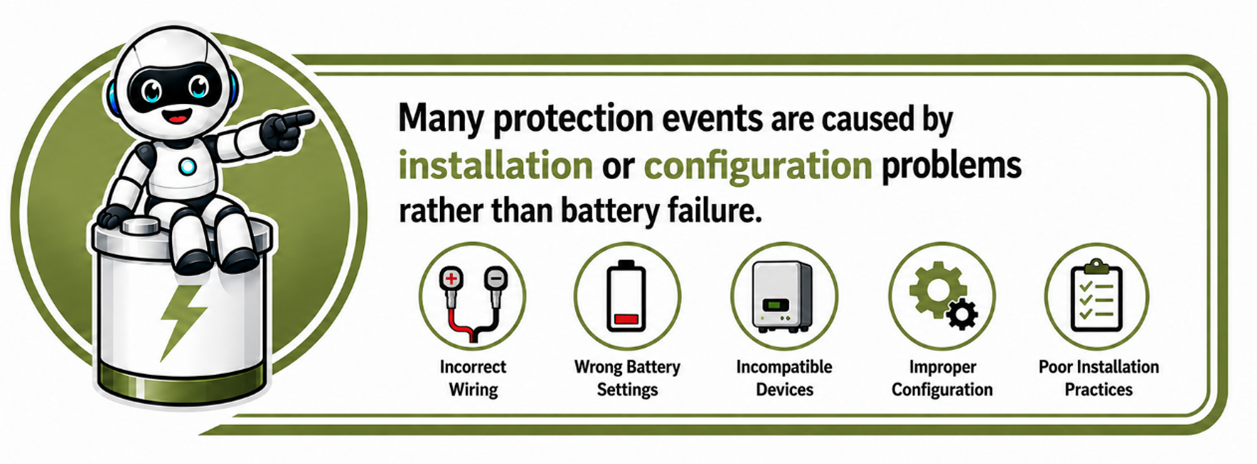
Many installers assume that a warning, alarm or shutdown means the battery has failed. In reality, the opposite is often true.
Most BMS warnings and protective actions indicate that the BMS is doing exactly what it was designed to do, protecting the battery from unsafe operating conditions before permanent damage occurs.
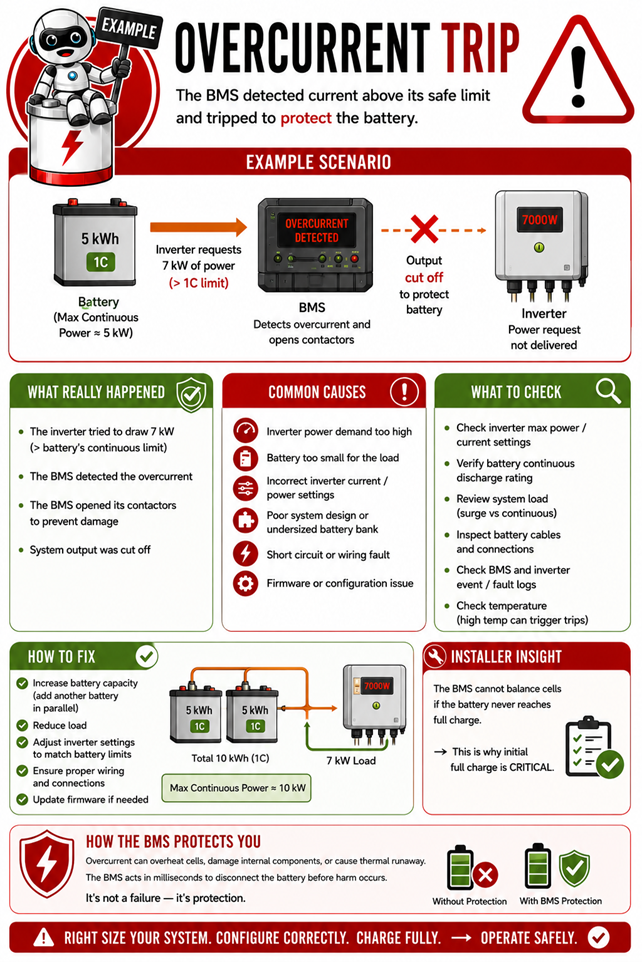
The following examples are based on common situations encountered in the field. Each example
explains:
- the operating scenario
- how the BMS detects the problem
- why the protection was triggered
- the most likely causes
- what to inspect during fault-finding
- how to resolve the issue correctly.
As you work through these examples, think like a professional installer. Rather than asking, "Why did the battery shut down?", ask "What condition did the BMS detect that required it to protect the battery?"
Understanding this difference will help you diagnose faults more accurately, reduce unnecessary battery replacements, and build safer, more reliable energy storage systems.
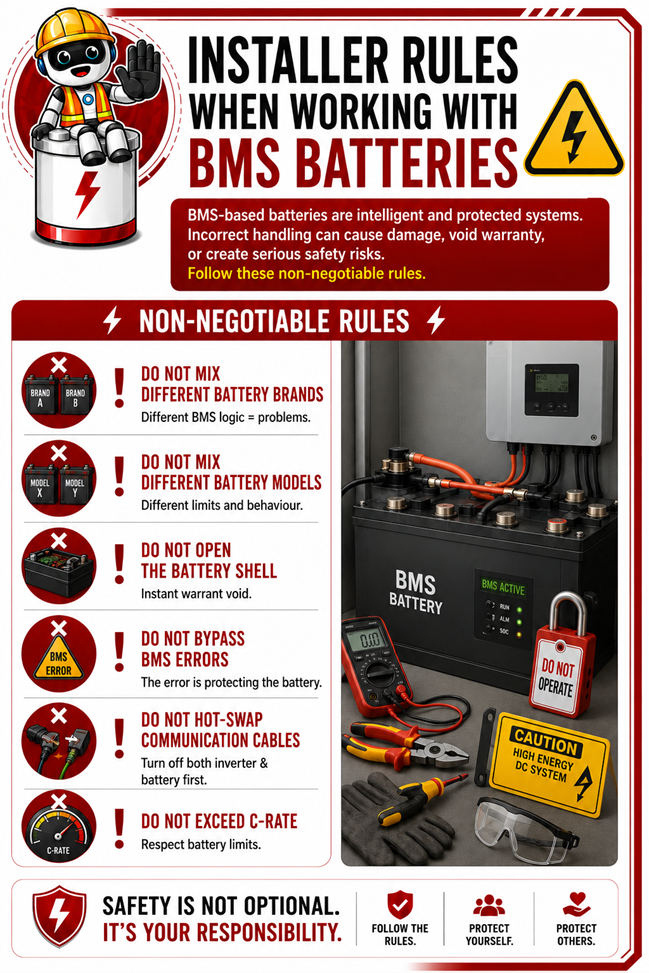
4.12 Installer Rules When Working With BMS-Based Batteries
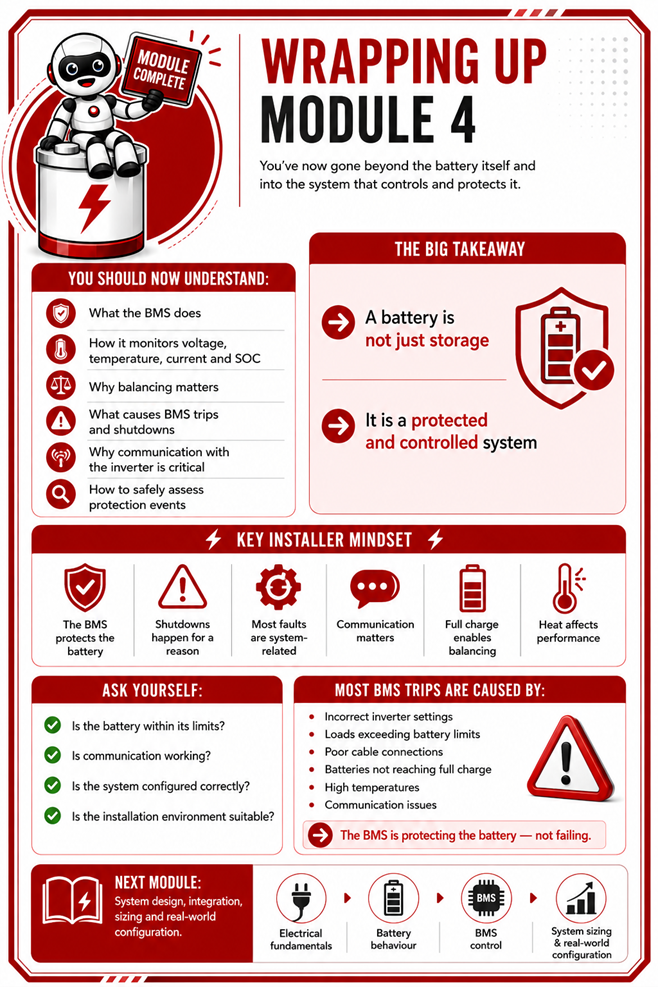
Wrapping Up Module 4
📚 Continue to Module 4 Assessment Quiz (Battery Management System)
You’ve reached the end of Module 4 (Battery Management System).