
5.1 Module 5 Learning Outcomes
This module brings everything together — electrical fundamentals, batteries, BMS and real-world installation thinking.
By the end of this module, you will be able to:
- Assess and calculate essential loads (kW and kWh)
- Size batteries correctly based on runtime requirements
- Select the correct inverter based on peak demand
- Size a solar array to support both loads and battery charging
- Understand how system components must work together
- Apply correct cable sizing and voltage drop principles
- Design systems that maximise battery lifespan and efficiency
- Identify common system design mistakes before installation
- Understand the basics of larger commercial and BESS systems
5.2 Why System Design Matters
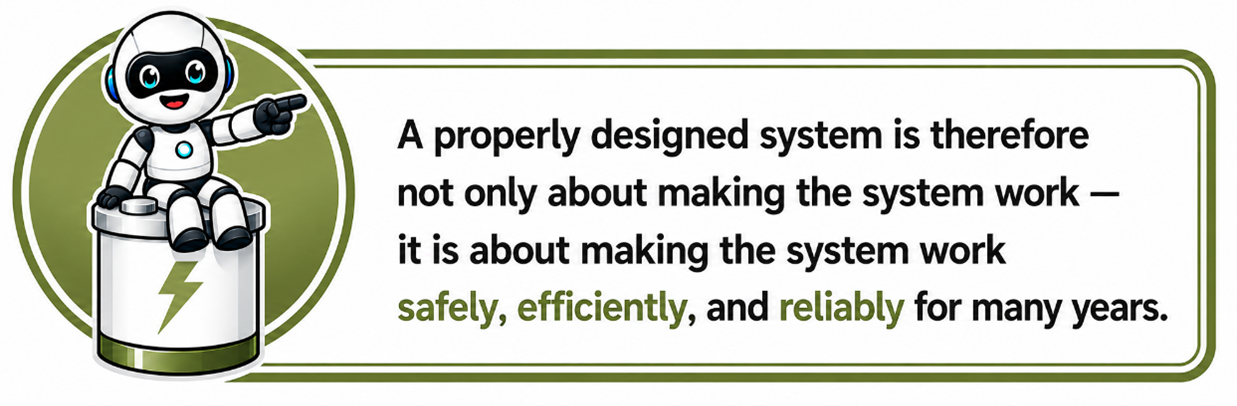
System design is one of the most important parts of any battery or solar installation because it determines how safely, efficiently, and reliably the entire system will operate.
Even the best batteries and inverters can perform poorly or fail if the system is designed incorrectly. A properly designed system ensures that all components work together correctly, that the battery bank is sized appropriately for the application, that cables and protection devices are correctly selected, and that the inverter, battery, and loads are compatible with each other.
Think of it like building a vehicle. A powerful engine alone does not guarantee a good car — the brakes, gearbox, fuel system, suspension, and tyres must all work together correctly.
The same applies to energy storage systems. Every component must be correctly selected and properly matched to the rest of the system.
Good system design helps ensure:
- stable and reliable operation
- correct battery charging and discharge behaviour
- improved safety
- longer battery lifespan
- proper load handling
- efficient energy usage
- reduced faults and downtime
Poor system design can lead to:
- nuisance tripping
- overheating
- incorrect charging
- shortened battery life
- communication problems
- overloaded components
- unstable system behaviour
- safety risks
5.3 Step 1 — Load Assessment: Understanding What Must Be Powered
The first and most important step in designing any battery or solar system is understanding exactly what the system needs to power. This process is called a load assessment.
A load assessment helps determine:
- how much power the system must supply
- how long the system must run
- which appliances are critical
- how large the inverter and battery bank need to be
Without a proper load assessment, the system may end up:
- too small and unable to support the required loads
- or unnecessarily oversized and far more expensive than needed
What is a 'Load'?
A load is anything that consumes electrical power.
Examples include:
- lights
- TVs
- Wi-Fi routers
- fridges
- computers
- kettles
- pumps
- air conditioners
- machinery
Every load uses a certain amount of power, usually measured in:
- watts (W)
- or kilowatts (kW)
Why Load Assessment is So Important
The battery and inverter can only supply a limited amount of power and energy.
If the system is not designed around the actual loads:
- the inverter may overload
- the batteries may drain too quickly
- runtime may be much shorter than expected
- equipment may trip or shut down
A proper load assessment ensures the system is designed realistically for the customer's needs.
Understanding Two Important Things
A load assessment looks at:
These are two different things.
- How much power is needed at one time
- How long the loads must run
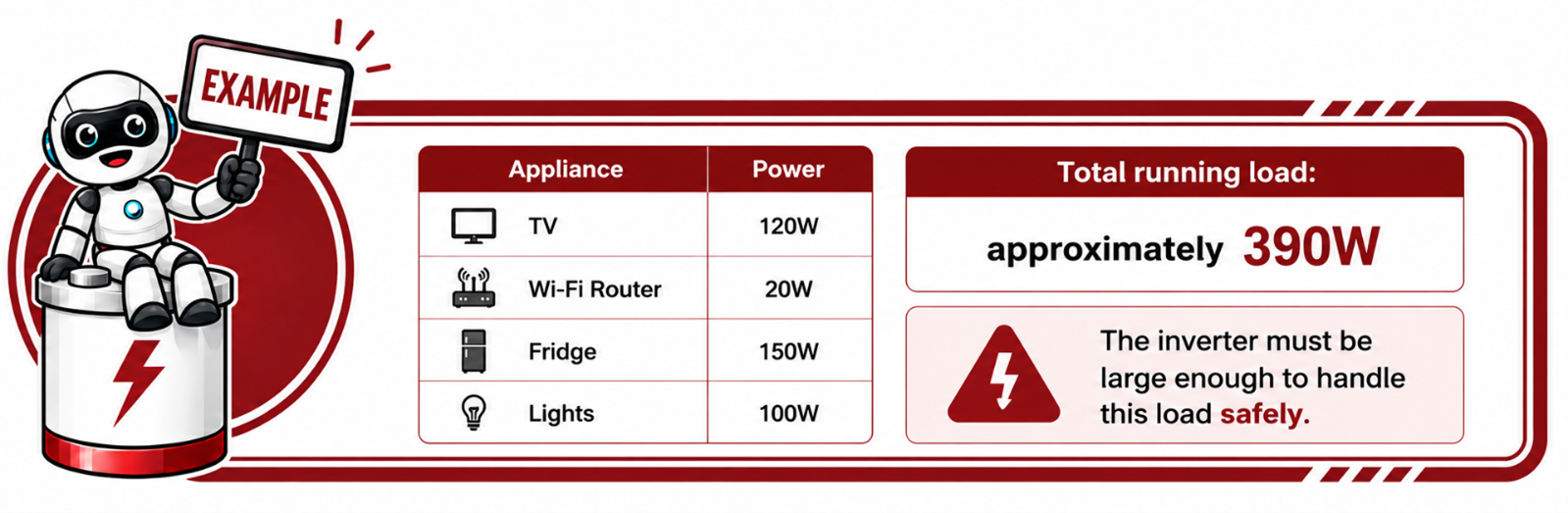
1. Power Requirement (Instant Demand)
This is the total power the system must supply at a specific moment.
Peak Loads and Startup Loads
Some appliances require extra power when starting.
Examples:
- fridges
- pumps
- compressors
- air conditioners
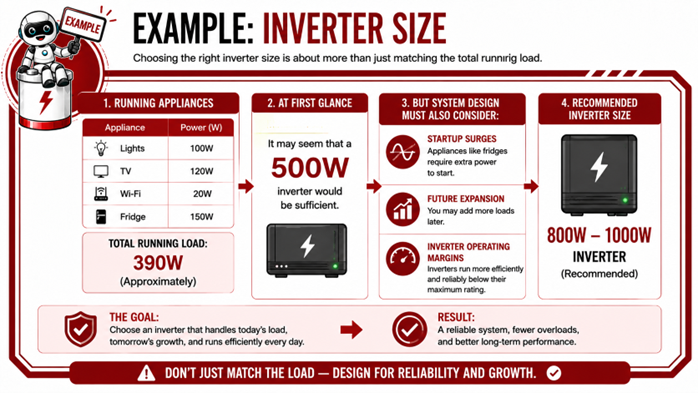
A fridge may normally run at:
- 150W
But during startup:
- it may briefly draw 600W or more.
The inverter must be able to handle these short startup surges.
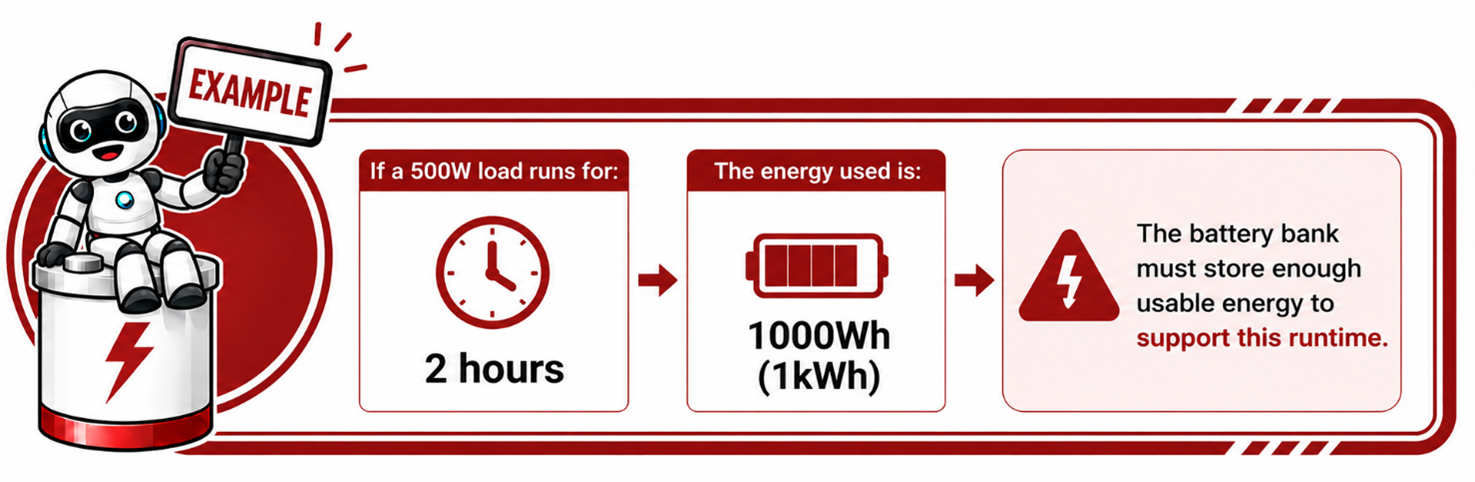
2. Energy Requirement (Runtime)
This determines how long the system must supply power.
Think of it like a fuel tank:
- power = how hard the engine works
- energy capacity = how long the fuel lasts
Critical Loads vs Non-Essential Loads
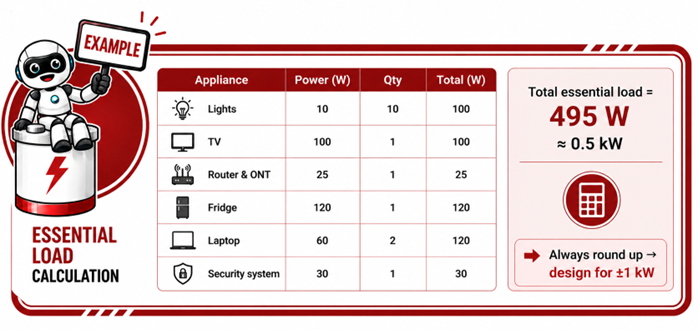
Not everything needs backup power. A good load assessment helps identify:
- critical loads
- non-essential loads
Critical Loads
These are the important items the customer wants to keep running during power outages.
Examples:
- lights
- internet
- TV
- security systems
- computers
- essential plugs
Non-Essential Loads
These are high-power appliances that may not need battery backup.
Examples:
- ovens
- geysers
- kettles
- pool pumps
- large air conditioners
Excluding unnecessary loads helps:
- reduce system cost
- improve runtime
- reduce battery stress
Why Accurate Information Matters
Customers often underestimate their usage.
For example:
- a kettle may use 2000W+
- a hairdryer may use 1800W+
- an air fryer may use 1500W+
Just one of these appliances can overload a small backup system.
This is why installers must properly assess the real expected loads.
Future Expansion Must Also Be Considered
Good system design also considers:
- future appliances
- additional batteries
- solar expansion
- changing customer needs
A system designed too tightly may become limiting later.

5.4 Step 2 — Calculate Backup Time Requirements (kWh)
Once the loads have been identified, the next step is to determine how long the customer wants those loads to operate during a power outage. This is called the backup time requirement and is one of the most important factors when sizing a battery system.
The backup time requirement determines:
- how much energy storage is needed
- how large the battery bank must be
- how long the system can support the required loads
While inverter sizing is mainly based on power (kW), battery sizing is mainly based on energy storage capacity, usually measured in kilowatt-hours (kWh).
Understanding the Difference Between kW and kWh
This is one of the most important concepts in battery system design.
KW(Kilowatts) =Power
This refers to:
- how much power is being used at a specific moment
Think of it like:
- the speed of a vehicle
- or how hard the engine is working
kWh (Kilowatt-hours) = Energy
This refers to:
- how much energy is used over time
Think of it like:
- how much fuel the vehicle uses during the trip
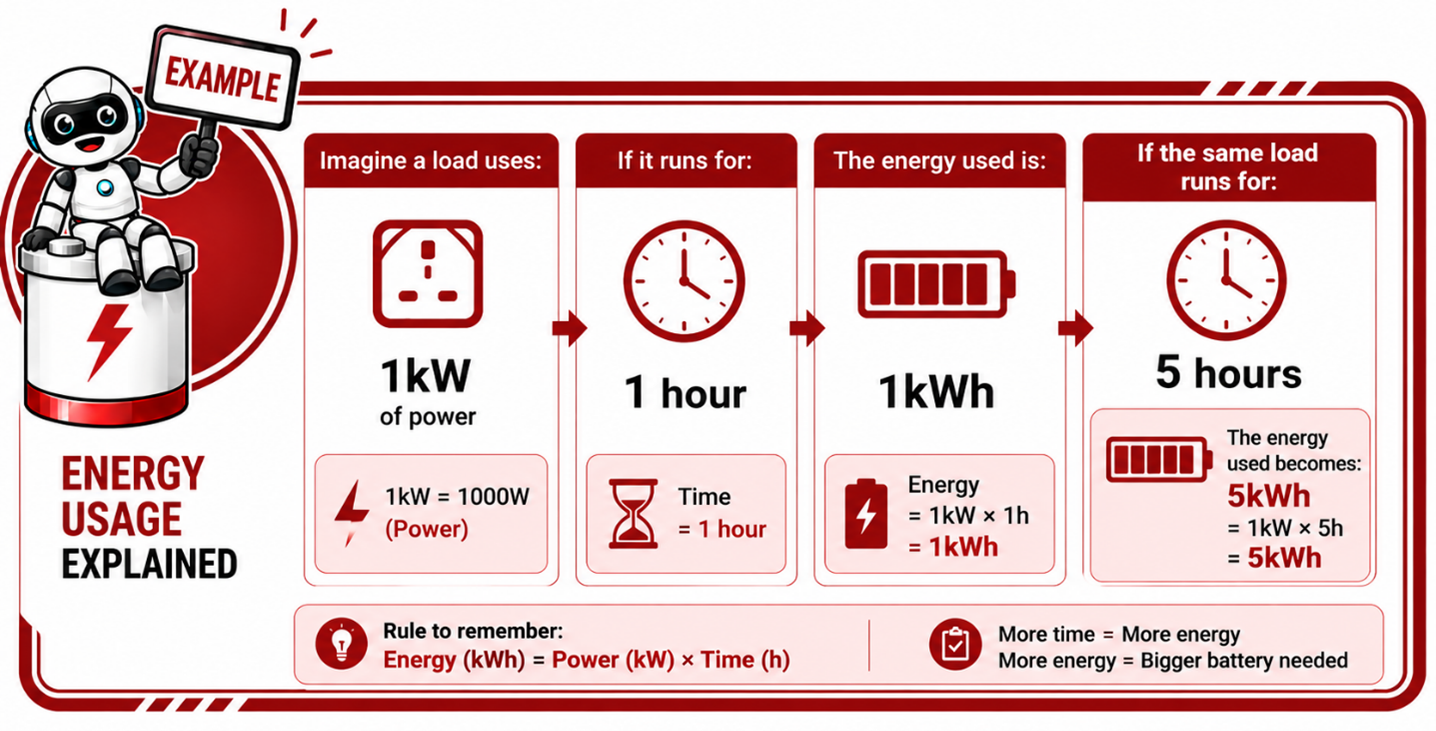
Simple Formula
Backup energy requirement is calculated as:
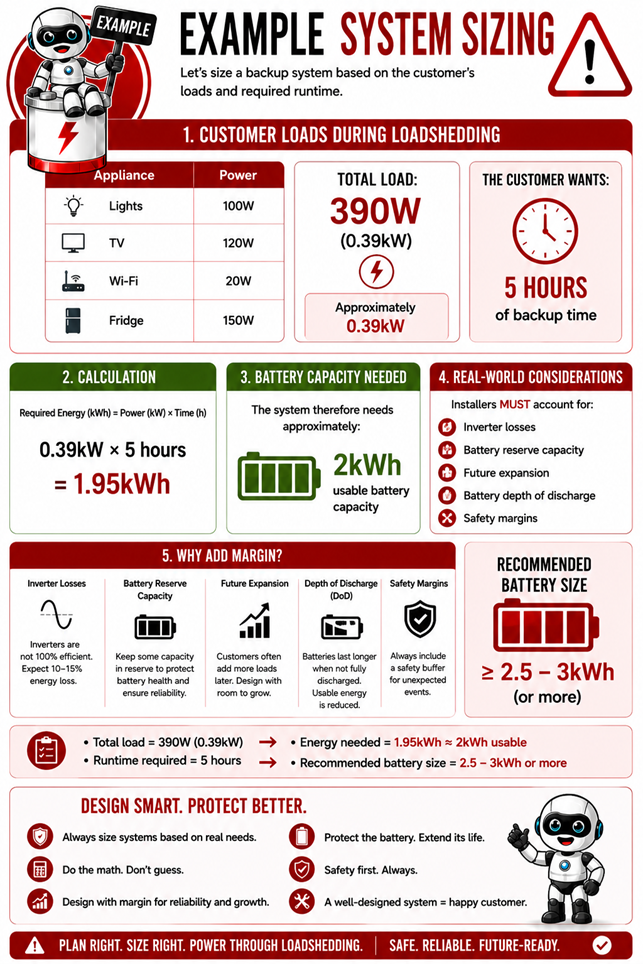
Power (kW) × Time (Hours) = Energy Required (kWh)
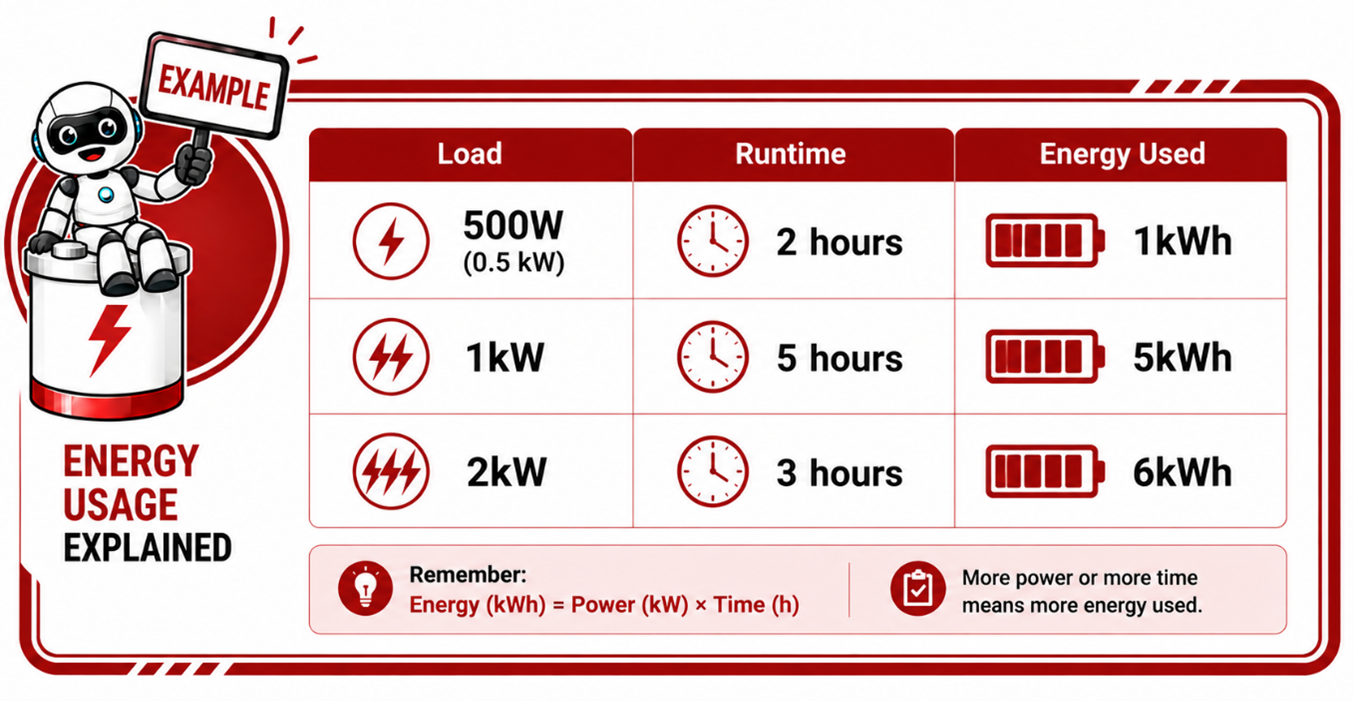
Why Backup Time Requirements Are So Important
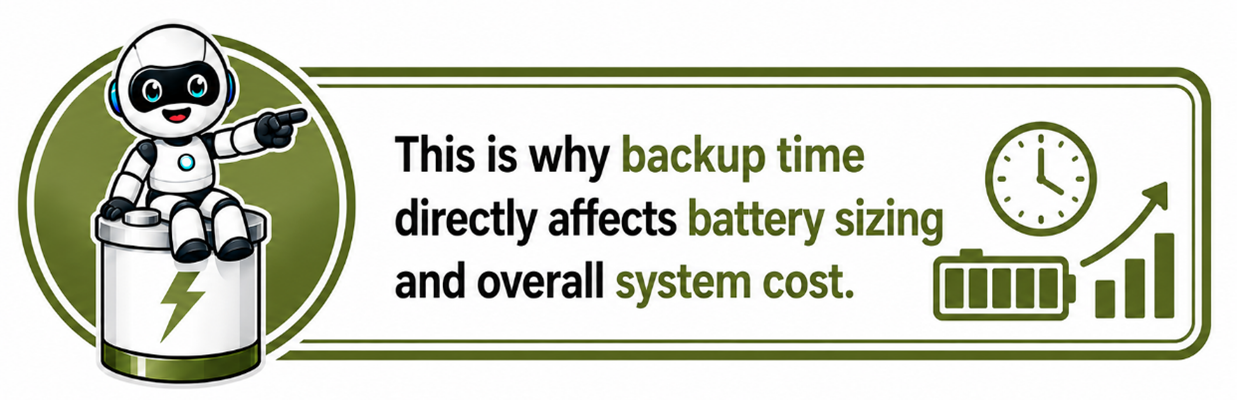
Two customers may have exactly the same loads but completely different battery requirements depending on how long they want backup power.
Customer A – Required backup time of 2 hours for a 1kW load
Customer B – Required backup time of 10 hours for a 1kW load
Even though the load is identical:
- Customer B needs a much larger battery bank
5.5 Step 3 — Select the Correct Battery Size
Once the load assessment and backup time requirements have been calculated, the next step is selecting the correct battery size.
This is one of the most important parts of system design because the battery determines how much energy the system can store and how long the loads can operate during a power outage.
The battery must be correctly sized to:
- support the required loads
- provide the required backup time
- operate safely within its limits
- allow for future expansion where necessary
- avoid excessive battery stress
If the battery is too small:
- runtime will be shorter than expected
- the battery may discharge too quickly
- the system may shut down prematurely
- battery lifespan may reduce due to excessive cycling
If the battery is too large:
- system cost increases unnecessarily
- charging times may become longer
- the customer may pay for unused capacity
The goal is therefore to select a battery size that is practical, efficient, reliable, and suitable for the customer’s actual needs.
Battery Capacity is Measured in kWh
Battery size is usually measured in:
- kilowatt-hours (kWh)
This represents:
- how much energy the battery can store
The larger the kWh rating:
- the longer the system can run the loads
Why Additional Capacity is Important
Real-world systems must account for:
- inverter losses
- reserve capacity
- surge loads
- battery aging
- temperature effects
- future expansion
- depth of discharge limits
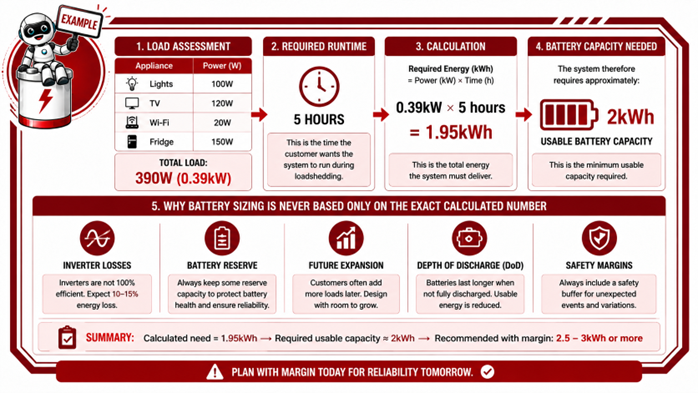
This means installers usually recommend a slightly larger battery than the minimum calculated requirement.
Although the calculation shows:
- approximately 2kWh required
An installer may recommend:
- a 5kWh battery
Why?
Because the larger battery:
- reduces battery stress
- improves runtime stability
- allows for future load growth
- provides reserve capacity
- improves battery lifespan
Matching Battery Size to Inverter Size
The battery must also be suitable for the inverter’s power requirements.
A very large inverter connected to a very small battery may:
- overload the battery
- exceed discharge limits
- trigger BMS protection events
The battery and inverter must therefore be correctly matched.
5.6 Step 4 — Select the Correct Inverter Size
Once the battery size has been determined, the next step is selecting the correct inverter size.
The inverter is one of the most important components in the system because it converts the battery's DC power into usable AC power for appliances and electrical equipment.
The inverter must be correctly sized to:
- safely handle the required loads
- support startup surges
- operate efficiently
- communicate correctly with the battery
- provide stable system performance
If the inverter is too small:
- it may overload
- trip during operation
- struggle with startup loads
- shut down unexpectedly
If the inverter is too large:
- system cost increases unnecessarily
- efficiency at low loads may reduce
- the battery may not be able to support the inverter properly
The goal is to select an inverter that matches the real power requirements of the system while allowing reasonable operating headroom.
Understanding Inverter Size
Inverter size is usually measured in:
- watts (W)
- or kilowatts (kW)
This refers to:
- how much power the inverter can supply at a specific moment
Unlike battery sizing, which is mainly based on runtime and energy storage (kWh), inverter sizing is mainly based on instantaneous power demand.
Continuous Power vs Surge Power
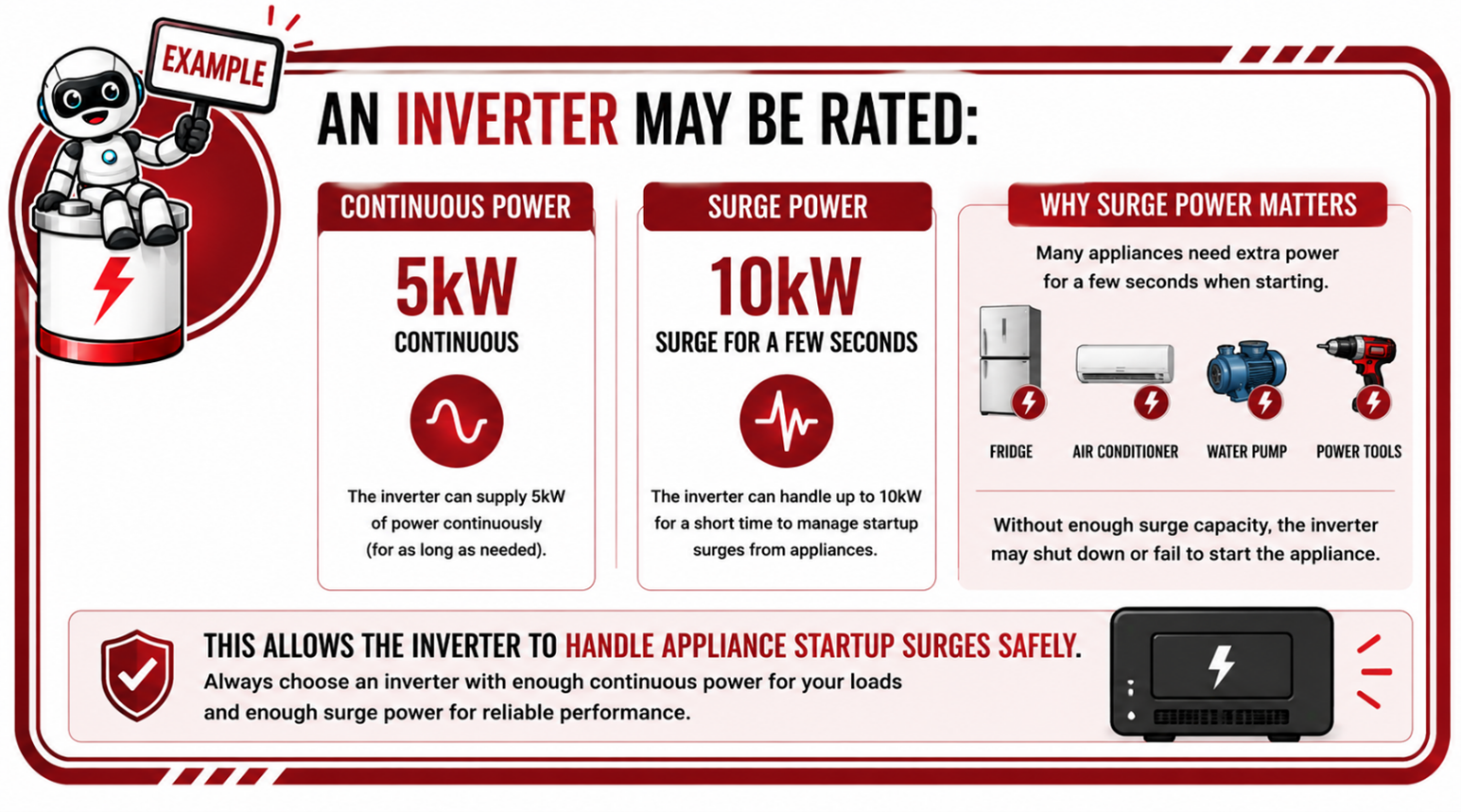
Most inverters have:
- a continuous power rating
- and a surge rating
Continuous Rating
The power the inverter can safely supply continuously during normal operation.
Surge Rating
Some appliances draw much higher power when starting than during normal operation.
Examples include:
- fridges
- pumps
- compressors
- air conditioners
- power tools
A fridge may normally use:
- 150W
But during startup:
- it may briefly draw 600W or more
This is called a surge load or startup current.
The inverter must be capable of handling these short bursts of power without tripping or shutting down.
Matching the Inverter to the Battery
The inverter and battery must work together correctly.
A very large inverter connected to a very small battery may:
- exceed the battery's discharge limits
- trigger BMS protection events
- cause voltage drops
- reduce battery lifespan
The battery must be capable of supplying the current the inverter requires.
Matching the Inverter to the System Voltage
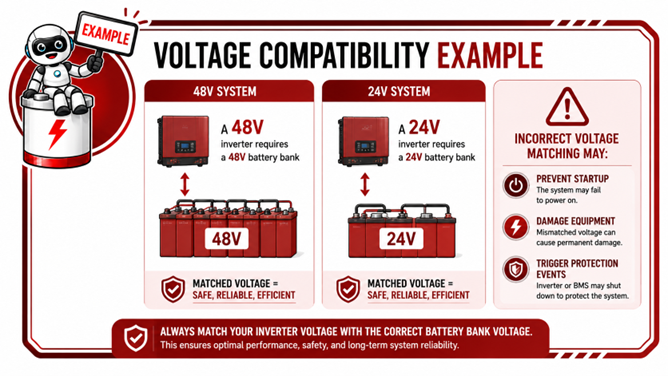
The inverter must also match the battery bank voltage.
For example:
- a 48V inverter requires a 48V battery bank
- a 24V inverter requires a 24V battery bank
Incorrect voltage matching can damage equipment or prevent operation entirely.
Communication Compatibility
Modern lithium systems also rely heavily on communication between:
- the inverter
- and the battery BMS
Compatible communication improves:
- charging accuracy
- protection
- SOC accuracy
- system stability
Proper inverter selection therefore includes:
- electrical compatibility
- communication compatibility
- manufacturer support compatibility
Installer Consideration
Customers often focus only on: (How many appliances can the inverter run?)
But installers must also consider:
- surge loads
- battery capability
- runtime expectations
- future growth
- charging requirements
- system efficiency
5.7 Step 5 — Size the Solar PV Array
Once the battery and inverter have been selected, the next step is sizing the solar PV array. The solar array is responsible for generating the energy that powers the loads and recharges the batteries.
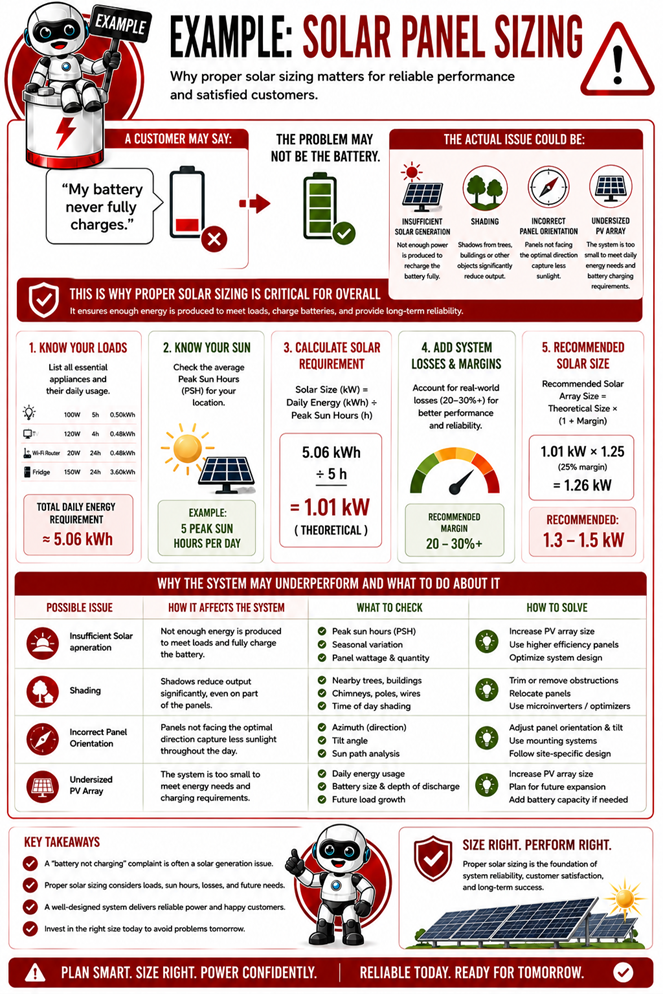
Correct solar sizing is extremely important because the solar panels must generate enough energy to:
- supply daytime loads
- recharge the batteries
- compensate for system losses
- support reliable system operation throughout the year
If the solar array is too small:
- batteries may not fully recharge
- backup time may reduce
- the system may rely heavily on grid or generator support
- battery lifespan may shorten due to chronic undercharging
If the solar array is too large:
- equipment limits may be exceeded
- unnecessary costs may increase
- the inverter or charge controller may limit excess production
The goal is therefore to design a solar array that provides sufficient energy generation while remaining within the safe operating limits of the system.
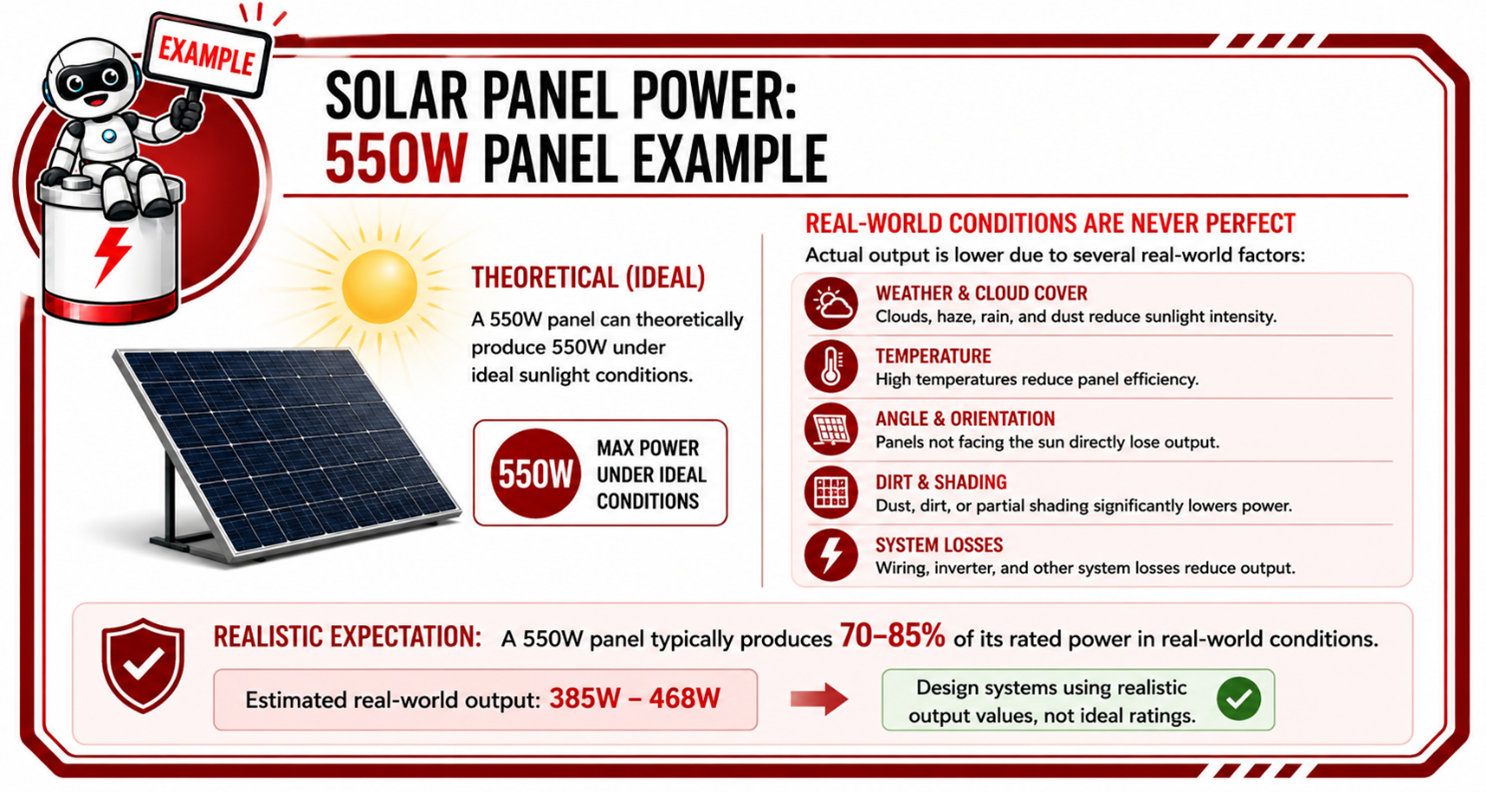
Understanding Solar Panel Power
Solar panels are usually rated in:
- watts (W)
- or kilowatts peak (kWp)
This rating indicates the maximum power the panel can produce under ideal test conditions.
Solar Array Sizing Starts with Energy Usage
The first step in PV sizing is understanding:
- how much energy the system uses per day
This is usually measured in:
- kWh per day
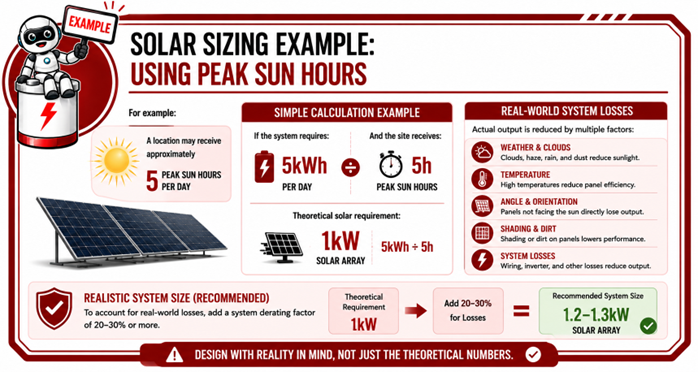
Imagine the system uses 5kWh per day.
The solar array must generate enough energy to:
- run the daytime loads
- recharge the battery for nighttime use
- compensate for system losses
In practice, the solar array must therefore generate more than the exact daily usage figure.
Understanding Peak Sun Hours
Solar panels do not produce full power all day long.
The amount of usable sunlight is often referred to as:
- Peak Sun Hours (PSH)
This represents the average number of hours per day during which the solar panels produce near-rated output.
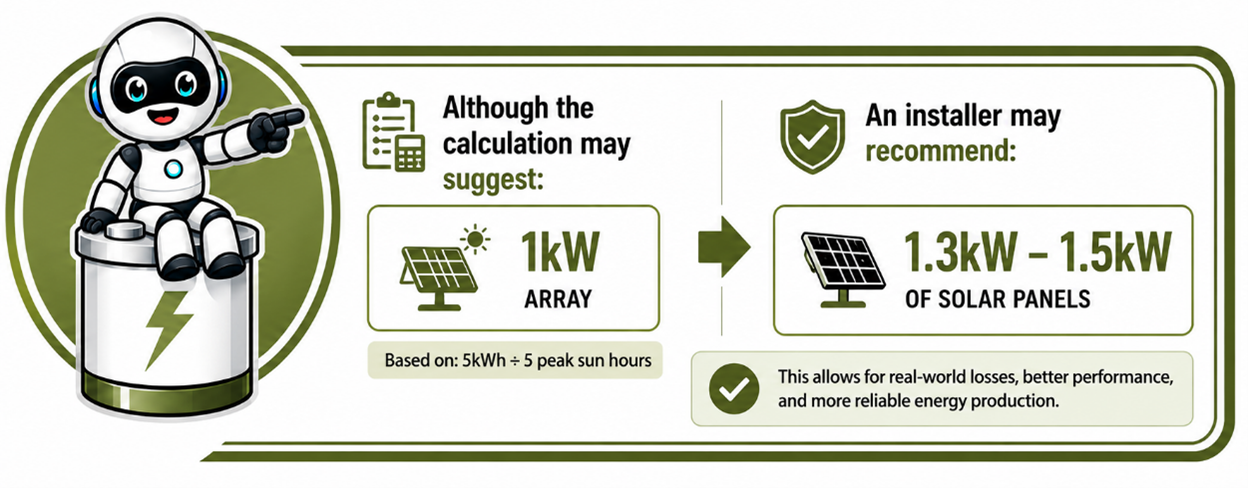
Losses Must Be Considered
Solar systems experience losses from:
- inverter efficiency
- temperature
- cable losses
- panel mismatch
- dirt and dust
- charging losses
- shading
- weather variation
Because of this, installers usually oversize the array slightly to ensure reliable performance.
Panel Orientation and Tilt Matter
Solar production is also heavily affected by:
- roof direction
- tilt angle
- shading
Poor panel placement can significantly reduce performance.
For example: Partial shading on one panel may affect the output of an entire string.
This is why proper site assessment is important.
Series and Parallel PV Design
Solar panels can also be connected in:
- series
- parallel
Similar to batteries.
Series PV Connection = Increases voltage
Parallel PV Connection = Increases current
The PV array must be designed within:
- inverter limits
- MPPT voltage ranges
- current limits
- safety requirements
Matching the PV Array to the Inverter
The solar array must remain within the inverter's:
- maximum PV voltage
- maximum PV current
- MPPT operating range
Incorrect PV sizing can:
- damage equipment
- prevent startup
- reduce efficiency
- trigger faults
This is why solar design calculations are extremely important.
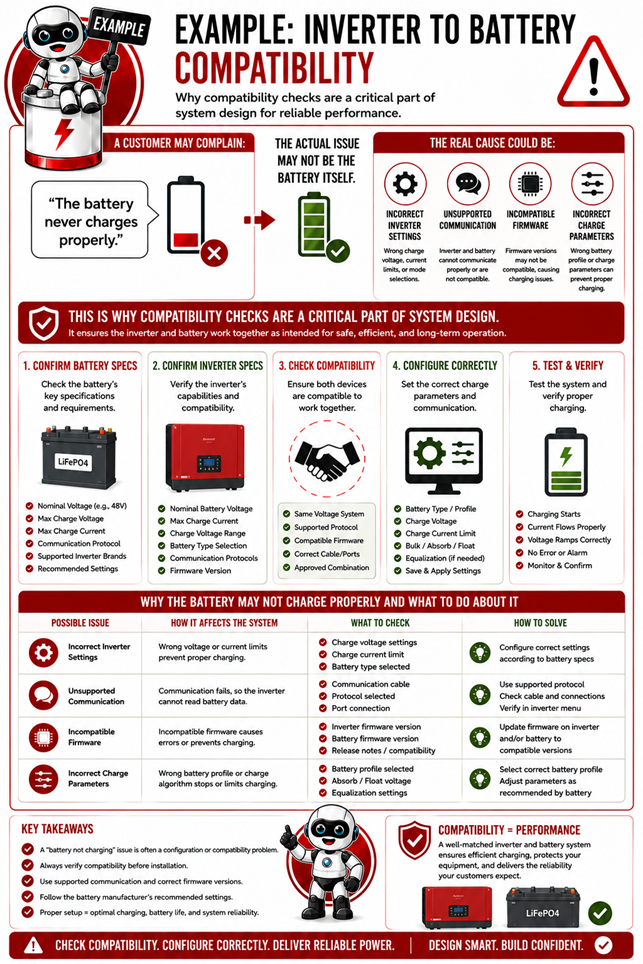
5.8 Step 6 — Check Inverter-to-Battery Compatibility
Once the battery, inverter, and solar array have been selected, it is critical to ensure that the inverter and battery are fully compatible with each other.
This is one of the most important parts of system design because even high-quality equipment may not operate correctly if the devices are not properly matched.
Many installation problems are not caused by faulty equipment, but rather by compatibility issues between the inverter and battery.
The inverter and battery must work together correctly in terms of:
- voltage
- charging parameters
- communication protocols
- current limits
- operating logic
- protection settings
If compatibility is poor, the system may still power on, but performance, reliability, and battery protection can be significantly affected.
Why Compatibility Matters
Modern lithium batteries are intelligent systems controlled by a BMS (Battery Management System). The inverter and BMS constantly exchange information to ensure the battery operates safely and efficiently.
The inverter relies on the battery BMS to provide information such as:
- battery state of charge (SOC)
- charge and discharge limits
- battery temperature
- alarms and warnings
- battery protection status
If the inverter cannot properly communicate with the BMS:
- charging may become inaccurate
- battery protection may reduce
- runtime estimates may be incorrect
- nuisance faults may occur
- battery lifespan may shorten
Voltage Compatibility
The first requirement is ensuring the inverter and battery operate at the same system voltage.
Communication Compatibility
Modern lithium systems rely heavily on communication between:
- the inverter
- and the battery BMS
This communication usually occurs through:
- CAN Bus
- RS485
- Modbus
The inverter and battery must support compatible communication protocols and correct communication settings.
Charge and Discharge Current Compatibility
The battery must also be capable of safely supplying the current the inverter requires.
A large inverter connected to a very small battery may demand excessive current.
This can result in:
- BMS overcurrent protection events
- voltage drops
- system shutdowns
- excessive battery stress
The inverter and battery must therefore be sized appropriately together.
Charging Parameter Compatibility
The inverter charging settings must match the battery manufacturer's specifications, including:
- charge voltage
- float voltage
- charge current
- low-voltage cut-off
- temperature behaviour
Incorrect charging settings can:
- reduce battery lifespan
- cause poor SOC accuracy
- trigger BMS faults
- prevent proper balancing
Parallel Battery Compatibility
If multiple batteries are installed in parallel:
- battery firmware
- communication settings
- battery versions
- addressing
must also be compatible.
Incorrect parallel configuration may lead to:
- communication faults
- uneven load sharing
- unstable operation
- protection events
5.9 Step 7 — Voltage Drop and Cable Sizing
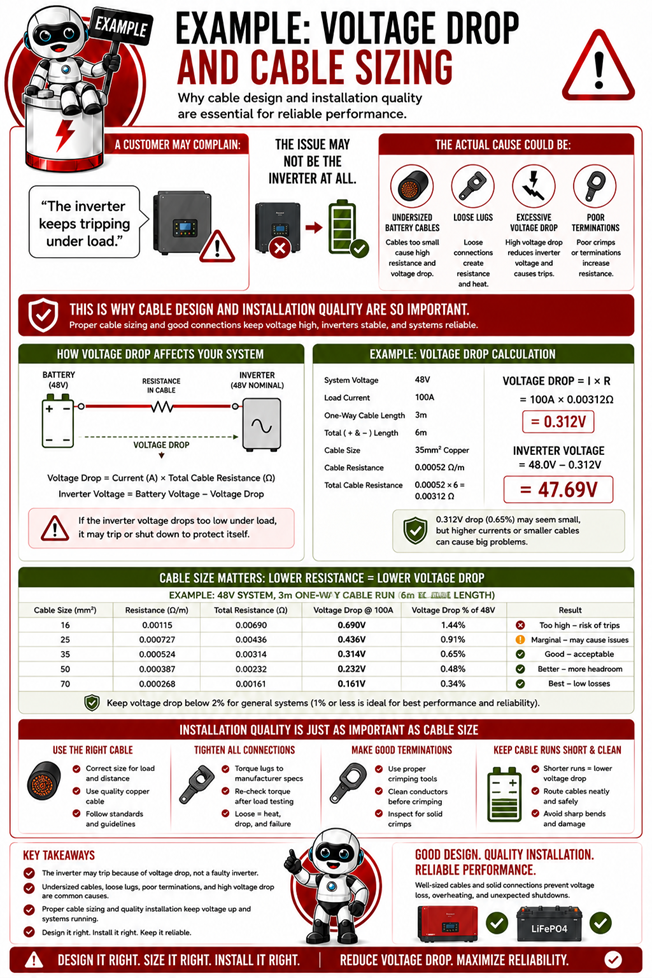
Correct cable sizing is a critical part of system design because cables are responsible for safely carrying power between the batteries, inverter, solar panels, and loads.
Even the best inverter and battery system can perform poorly if the cables are undersized or installed incorrectly.
Cables may seem simple, but they directly affect:
- system safety
- efficiency
- voltage stability
- charging performance
- inverter operation
- battery lifespan
Incorrect cable sizing is one of the most common causes of:
- overheating
- inverter faults
- poor charging
- voltage instability
- nuisance tripping
- damaged terminals
- fire risks
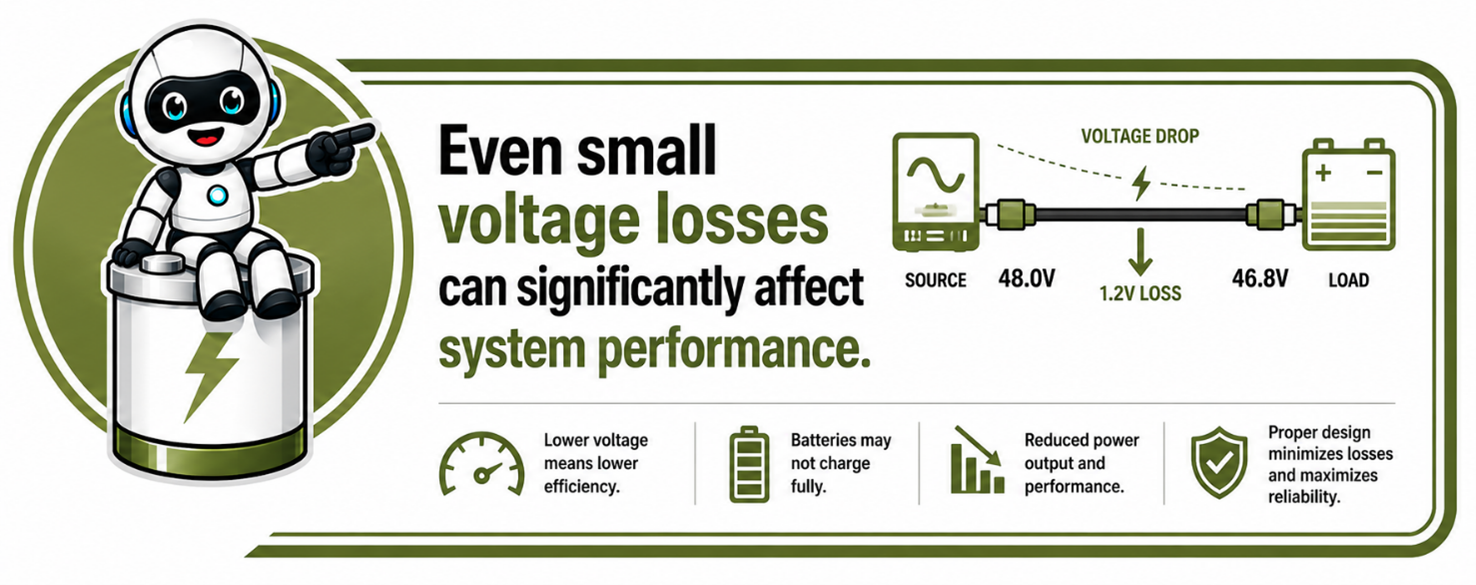
What is Voltage Drop?
Voltage drop is the reduction in voltage that occurs as electricity travels through a cable.
As current flows through a cable:
- the cable creates resistance
- resistance causes energy loss
- some voltage is lost along the cable
The longer the cable or the higher the current:
- the greater the voltage drop becomes.
Effects of Excessive Voltage Drop
Excessive voltage drop can cause:
- poor inverter performance
- incorrect charging behaviour
- low battery voltage alarms
- reduced efficiency
- excessive heat
- unstable system operation
Special Considerations for Battery Systems
In battery systems, this becomes especially important because battery systems often operate at:
These conditions make proper cable sizing critical for reliable operation.
- high current
- relatively low voltage
5.10 Step 8 — Designing for Performance and Long Battery Life
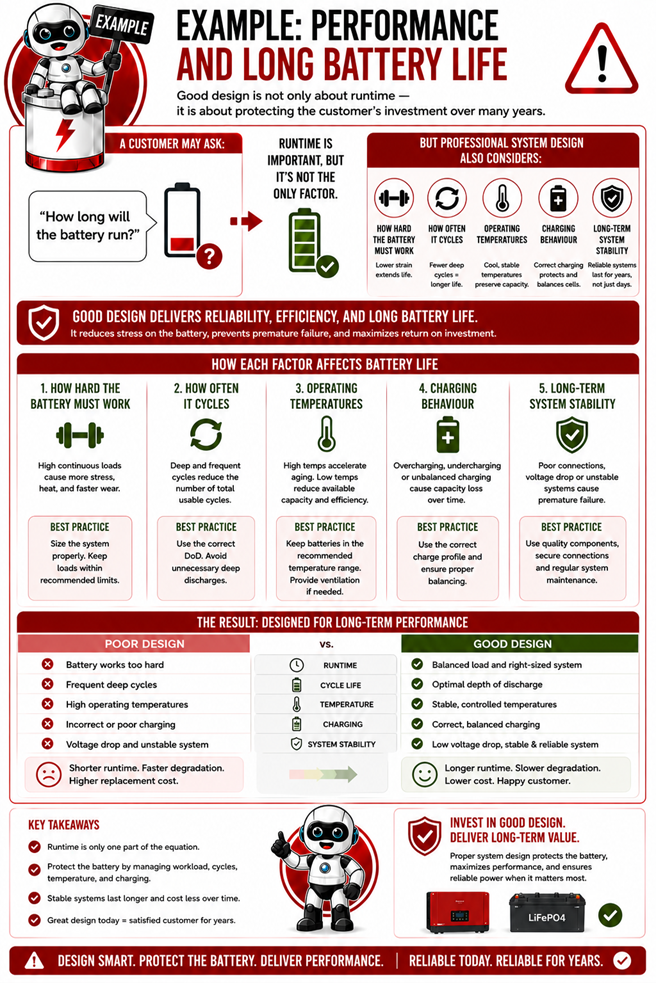
A good battery system should not only work today — it should continue operating safely, efficiently, and reliably for many years.
This is why proper system design must always consider long-term battery performance and lifespan, not just whether the system can power the loads immediately after installation.
Lithium batteries are a major investment, and the way the system is designed has a direct impact on:
- battery lifespan
- system reliability
- charging performance
- efficiency
- operating temperature
- long-term stability
A poorly designed system may still function initially, but excessive stress, incorrect settings, or poor operating conditions can significantly shorten battery life over time.
Batteries Perform Best Within Safe Operating Conditions
Lithium batteries are designed to operate within specific limits.
The BMS continuously protects the battery against:
- overcharging
- deep discharge
- excessive current
- overheating
- unsafe operating conditions
However, good system design aims to avoid these conditions altogether rather than relying on the BMS to constantly intervene.
Avoid Constant High Stress
Batteries last longer when they are not constantly pushed to their limits.
A system designed too tightly may cause:
- deep daily discharges
- high charging current
- excessive discharge current
- frequent protection events
- increased operating temperatures
Over time, this increases battery wear and reduces lifespan.
Depth of Discharge (DoD) Affects Lifespan
Although lithium batteries support deep discharge, constantly operating at maximum depth of discharge increases stress on the cells.
For example:
- regularly cycling a battery from 100% to 0% creates more stress than:
- cycling between 80% and 30%
Good system design considers:
- realistic usable capacity
- reserve margins
- reduced battery stress
to improve long-term performance.
Temperature Has a Major Impact
Battery temperature significantly affects:
- performance
- charging behaviour
- lifespan
Excessive heat is one of the biggest causes of accelerated battery aging.
Poor ventilation or incorrect installation locations can lead to:
- overheating
- reduced efficiency
- shortened battery life
- increased protection events
This is why batteries should always be installed in:
- well-ventilated areas
- clean environments
- suitable operating temperatures
Proper Charging is Critical
Correct charging settings are essential for battery health.
Incorrect:
- charge voltage
- charge current
- float settings
- inverter configuration
can:
- reduce battery lifespan
- prevent balancing
- cause inaccurate SOC
- trigger BMS alarms
Good system design always follows manufacturer charging specifications.
Correct Solar Sizing Improves Battery Health
A solar array that is too small may:
- leave batteries partially charged for long periods
- prevent balancing
- reduce SOC accuracy
- increase cycling stress
Proper solar sizing helps ensure:
- healthy charging behaviour
- regular full charge opportunities
- stable system operation
Cable Quality and Voltage Stability Matter
Undersized cables and poor terminations can cause:
- voltage drops
- unstable charging
- excessive heat
- inverter faults
Stable voltage and good power delivery improve:
- battery performance
- charging accuracy
- system efficiency
Communication Improves Long-Term Performance
Modern lithium systems rely heavily on proper communication between:
- the inverter
- and the battery BMS
Good communication allows:
- smarter charging
- improved protection
- better balancing
- accurate SOC calculations
- stable system control
Poor communication can reduce overall system performance and battery lifespan.
5.11 Real-World System Design Examples
Understanding the theory behind system design is important, but seeing how these principles are applied in real-world situations makes the concepts far easier to understand.
Every battery energy storage system is designed around the customer's specific needs. While the design process remains the same, the final system can vary significantly depending on factors
such as:
- the type of application
- the loads that must be powered
- required backup time
- available solar generation
- budget
- installation space
- future expansion requirements.
A professional installer does not simply select a battery and inverter. They analyse the customer's energy requirements, calculate the expected loads, determine the required runtime, and then
select components that work together safely, efficiently and reliably.
The following examples demonstrate how the same design principles are applied across a variety of residential, commercial and industrial applications. As you review each example, pay attention
to:
- the design goals
- the critical loads being supported
- how the battery, inverter and solar array have been sized
- the expected system performance
- the practical design considerations
- how the system could be expanded in the future.
These examples are intended to demonstrate the design process rather than provide fixed system
templates. Every installation is unique, but the engineering principles remain the same.
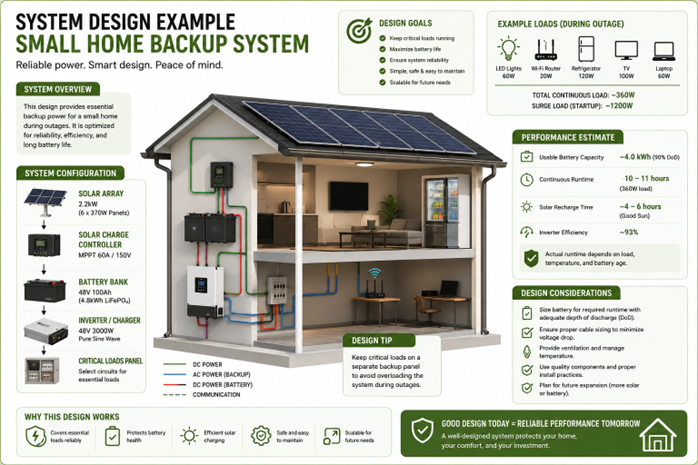
Example 1 – Small Home Backup System
This example illustrates a basic residential backup system designed to keep essential household appliances operating during power outages. The emphasis is on simplicity, reliability and cost-
effective backup for everyday loads.
As you study this design, notice how the battery capacity, inverter size and solar array are matched to relatively small continuous loads and longer runtime requirements.
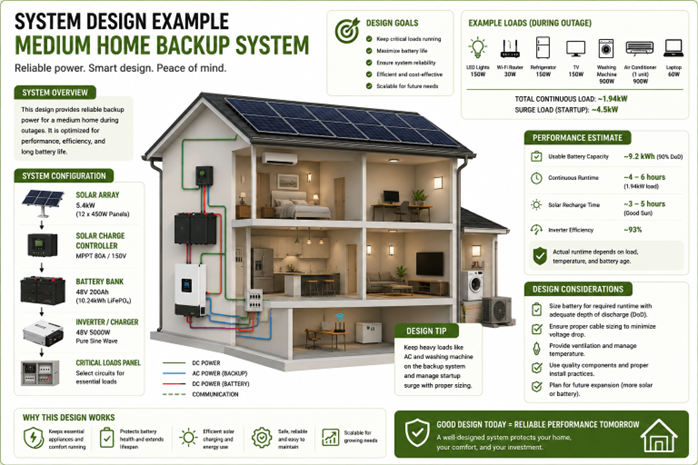
Example 2 – Medium Home Backup System
This example demonstrates a larger residential installation supporting additional household appliances and higher daily energy demand. Compared with the previous example, larger battery
storage and inverter capacity are required while maintaining efficient system operation.
Observe how increasing the number of appliances affects every major design decision.
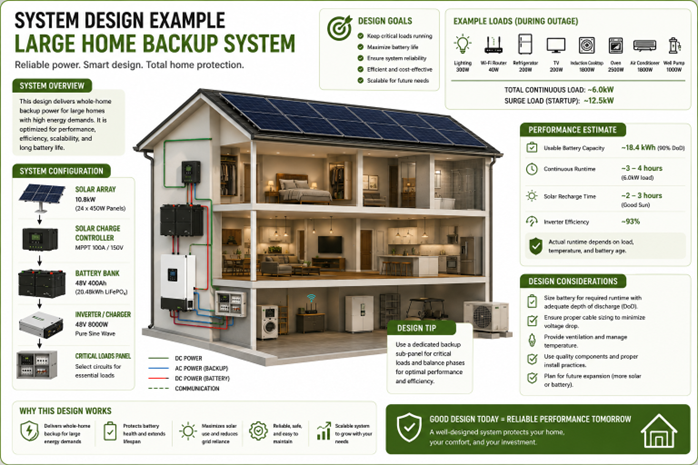
Example 3 – Large Home Backup System
This example shows a whole-home backup solution designed for larger properties with higher energy consumption. Multiple high-power appliances and larger surge loads require careful sizing
of the inverter, battery bank and solar array.
Notice how the design balances high performance with future scalability and long-term system reliability.
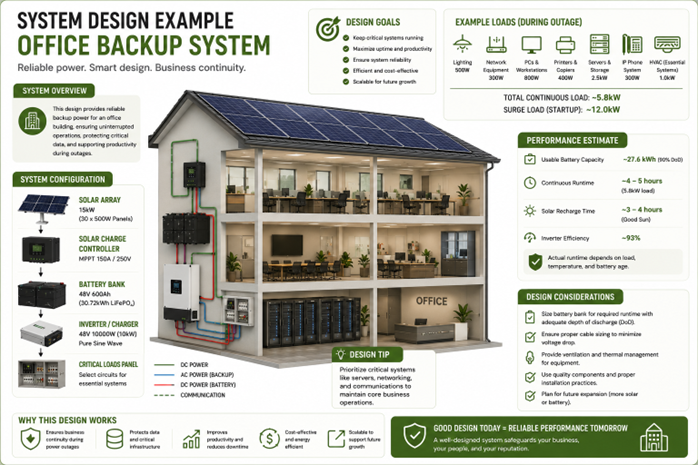
Example 4 – Office Backup System
Business continuity is the primary objective of this design. Critical office equipment such as computers, servers, networking equipment, lighting and communication systems are prioritised to
minimise downtime during power outages.
Consider how commercial installations often focus on protecting productivity rather than powering every electrical load.
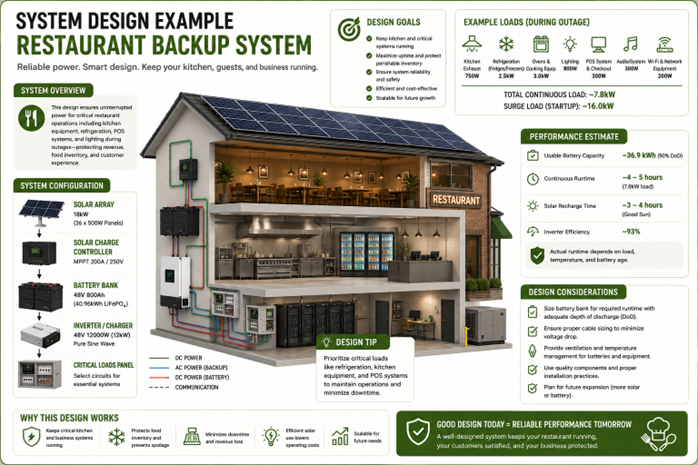
Example 5 – Restaurant Backup System
Restaurants place greater demands on backup systems because refrigeration, food preparation equipment, lighting and point-of-sale systems are business-critical. Larger continuous and surge
loads require careful component selection and appropriate battery capacity.
Observe how maintaining operations and protecting refrigerated stock become key design priorities.
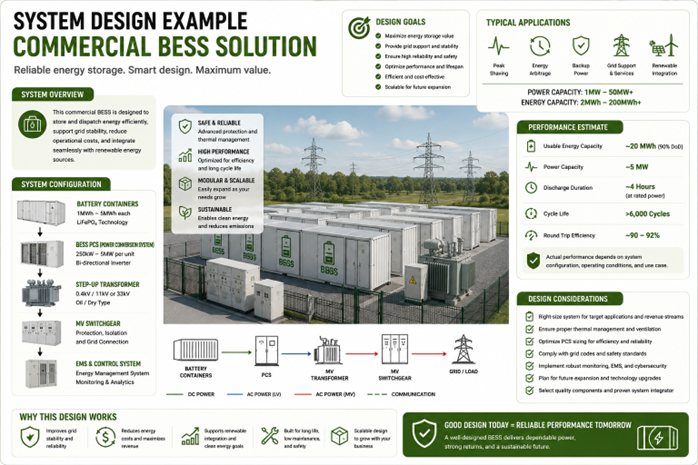
Example 6 – Commercial BESS Solution
This example introduces a commercial Battery Energy Storage System (BESS) designed for industrial and utility-scale applications. Unlike residential backup systems, these installations may
provide peak shaving, demand management, renewable energy integration, grid support and energy arbitrage in addition to backup power.
Notice how the scale of the system changes dramatically, but the same fundamental design principles still apply—correct sizing, system protection, efficiency, reliability and future scalability.
Key Design Lessons
Although these systems vary greatly in size and application, they all follow the same design process:
1.Understand the customer's operational requirements.
2.Identify the critical loads.
3.Calculate continuous and surge power demand.
4.Determine the required backup duration.
5.Size the battery bank to provide sufficient usable energy.
6.Select an appropriately rated inverter.
7.Size the solar array to recharge the batteries and support ongoing energy needs.
8.Design for safety, efficiency, reliability and future expansion.
The difference between a small residential backup system and a large commercial BESS is not the design methodology—it is the scale of the application. Professional installers apply the same
engineering principles to every installation, regardless of size.
Remember: Successful system design is not about installing the biggest battery or the largest inverter. It is about designing a balanced system where every component is correctly matched to
the customer's energy requirements, operational goals and future needs.
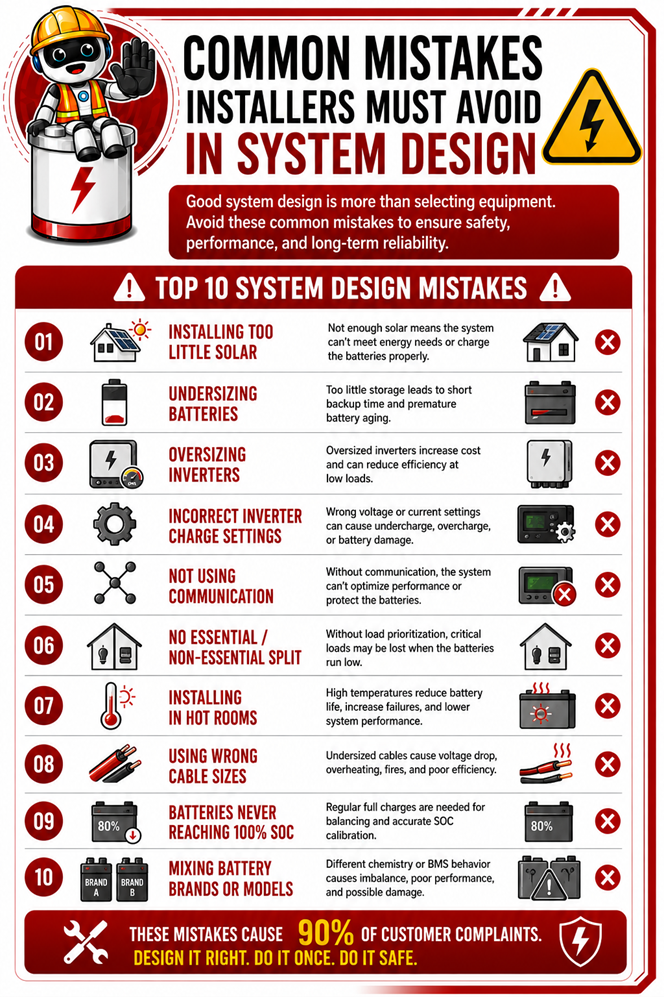
5.12 Common Mistakes Installers Must Avoid
Good system design is about avoiding common mistakes before installation.
Mistakes can include ignoring startup loads, undersizing cables, mismatching inverter and battery voltage, and failing to plan for future expansion.
A careful design process helps prevent nuisance trips, overheating, incorrect charging, shortened battery life, communication faults, overloaded components, unstable system behaviour and safety risks.
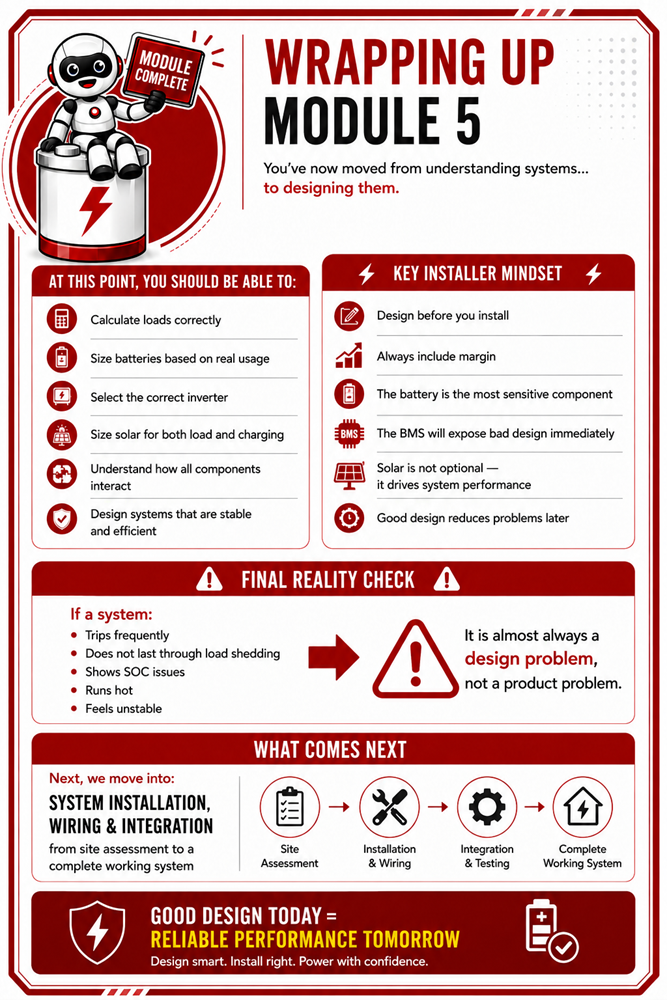
Wrapping Up Module 5
📚 Continue to Module 5 Assessment Quiz (Energy System Design & Sizing)
You’ve reached the end of Module 5 (Energy System Design & Sizing).